
What's New
TopBar
-
The Apps view/section of the TopBar now supports drag & dropping Windows Start Menu pinned apps and icons.
-
You can now choose which metric appears on the standard notch of the TopBar when it's on the Performance view. Previously, the currently active/focused program's metric would be shown but now you can choose between the old behavior or displaying any single metric that matters to you instead. Your choices are saved.
DNS 
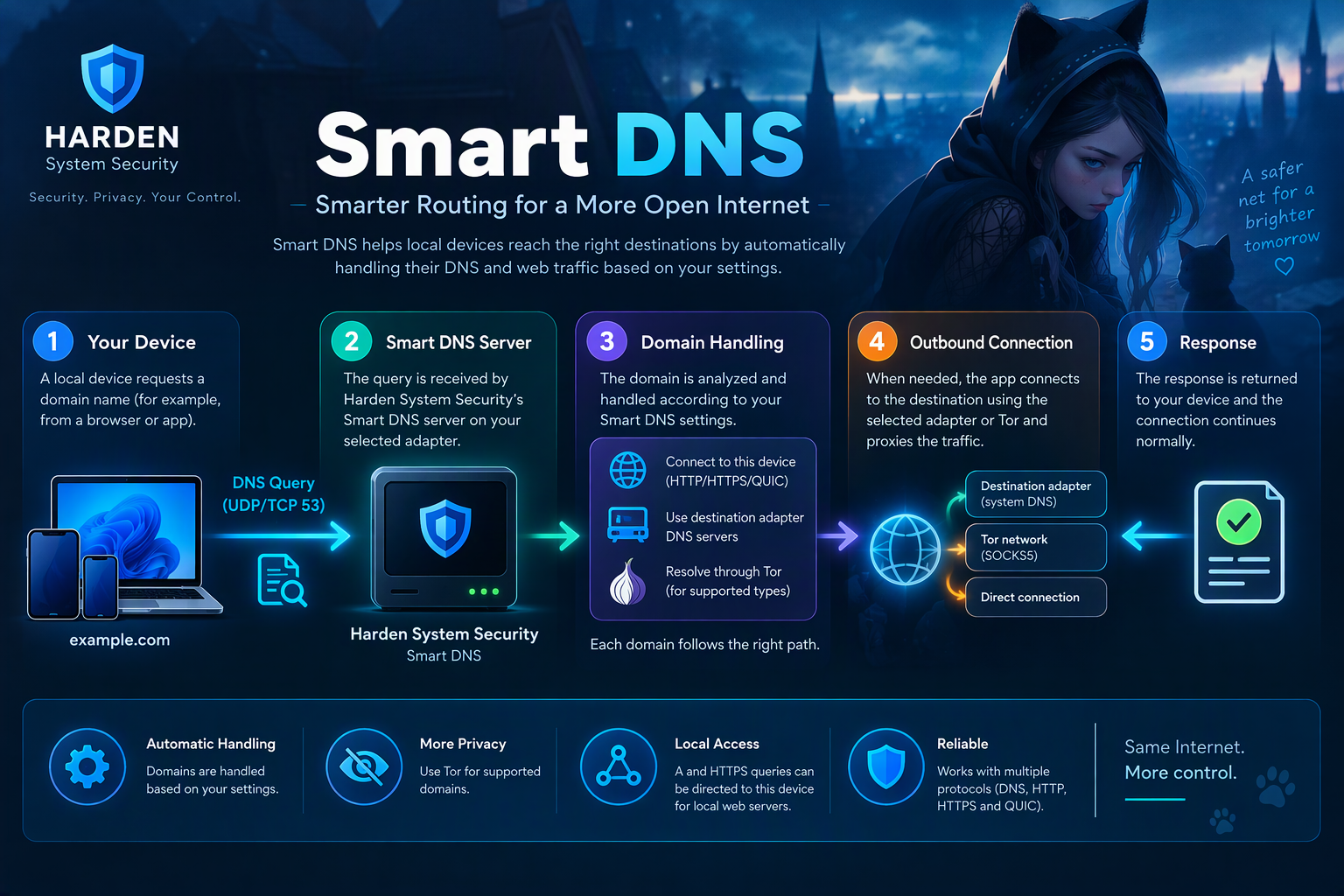


The DNS page is a new dedicated feature in the Harden System Security app. It turns your computer into a DNS server for the other devices on your network, such as phones, tablets, TVs, consoles and so on, and it offers 3 different servers, each in its own tab:
- Smart DNS: Lets other devices use your computer's Internet connection (for example its VPN connection) only by changing their DNS server.
- DNS over HTTPS: An encrypted DNS over HTTPS (DoH) server.
- DNS: A regular DNS server.
Every server can optionally send its traffic through the Tor network for increased anonymity and security. Only one server runs at a time.
Important
Highly recommended to visit the following GitHub Wiki document for all the information: https://github.com/HotCakeX/Harden-Windows-Security/wiki/DNS
Others
- Updated dependencies to the latest versions.