
Highlights
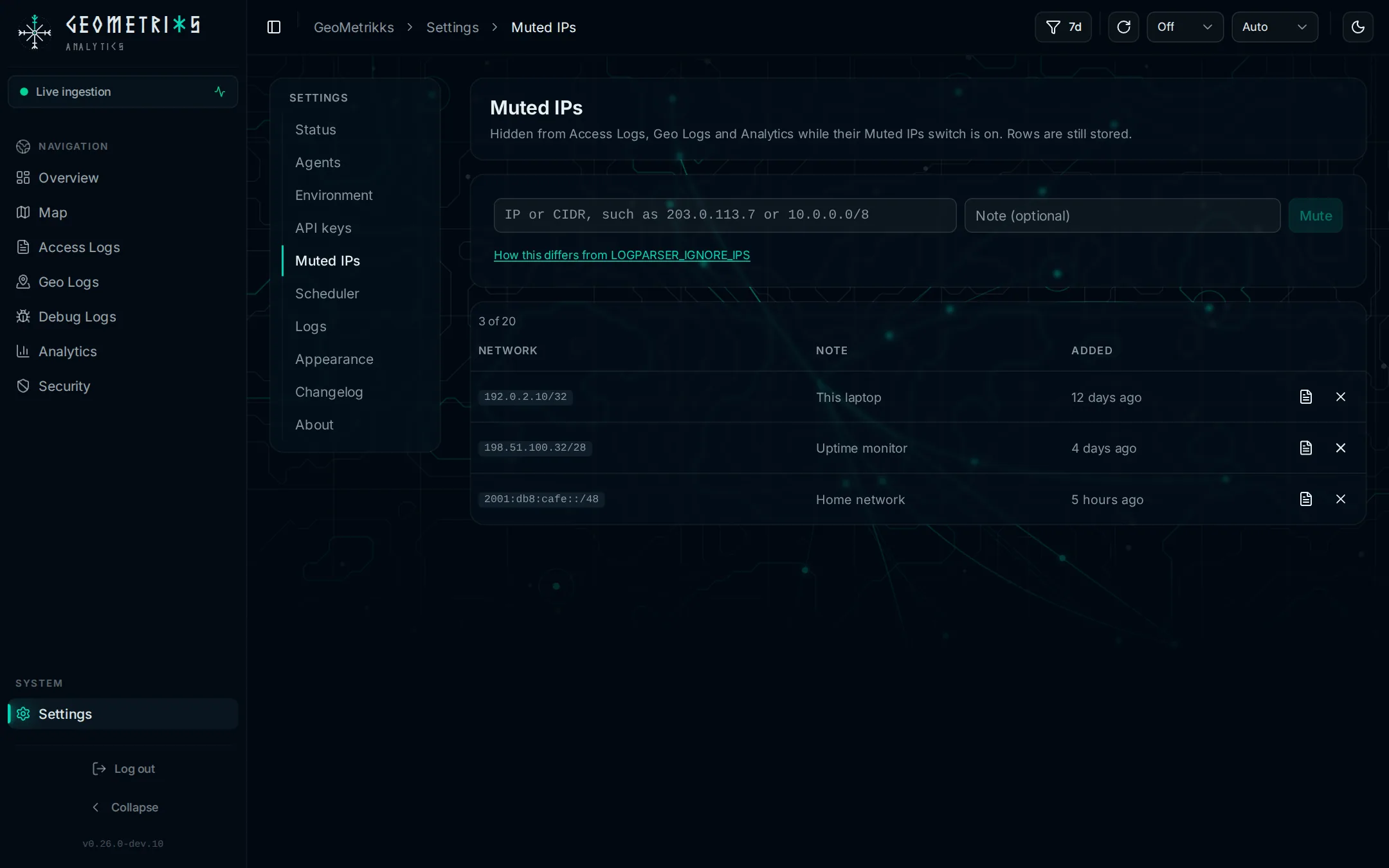
- Muted IPs. Save up to 20 IP addresses and CIDR ranges in the database under Settings > Muted IPs, or add them from the IP actions menu with Mute IP, and hide them from Access Logs History, Geo Logs and Analytics with one switch while keeping every row stored. The list is shared across browsers and devices, while the switch is stored per browser and starts on by default. Each row on Settings > Muted IPs has a Show in Access Logs button, and filtering by an explicit IP turns muting off for that view.
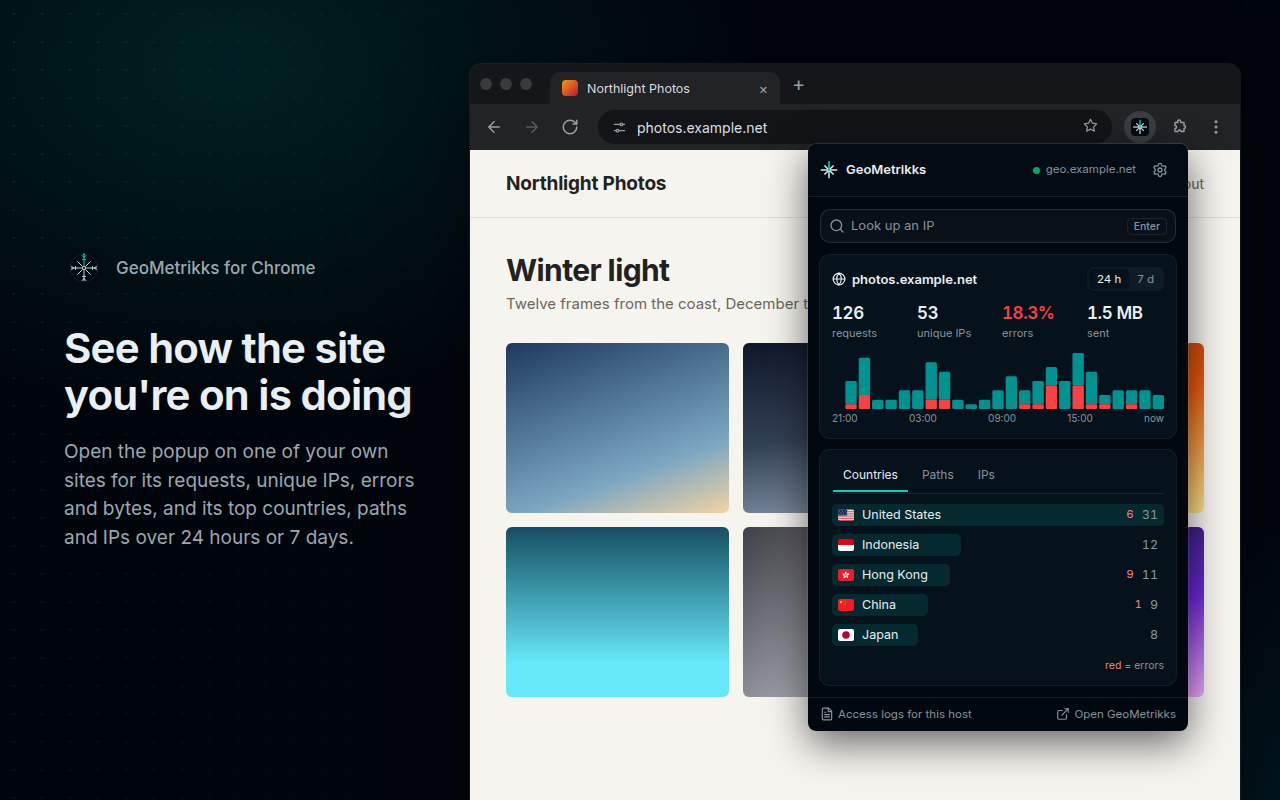
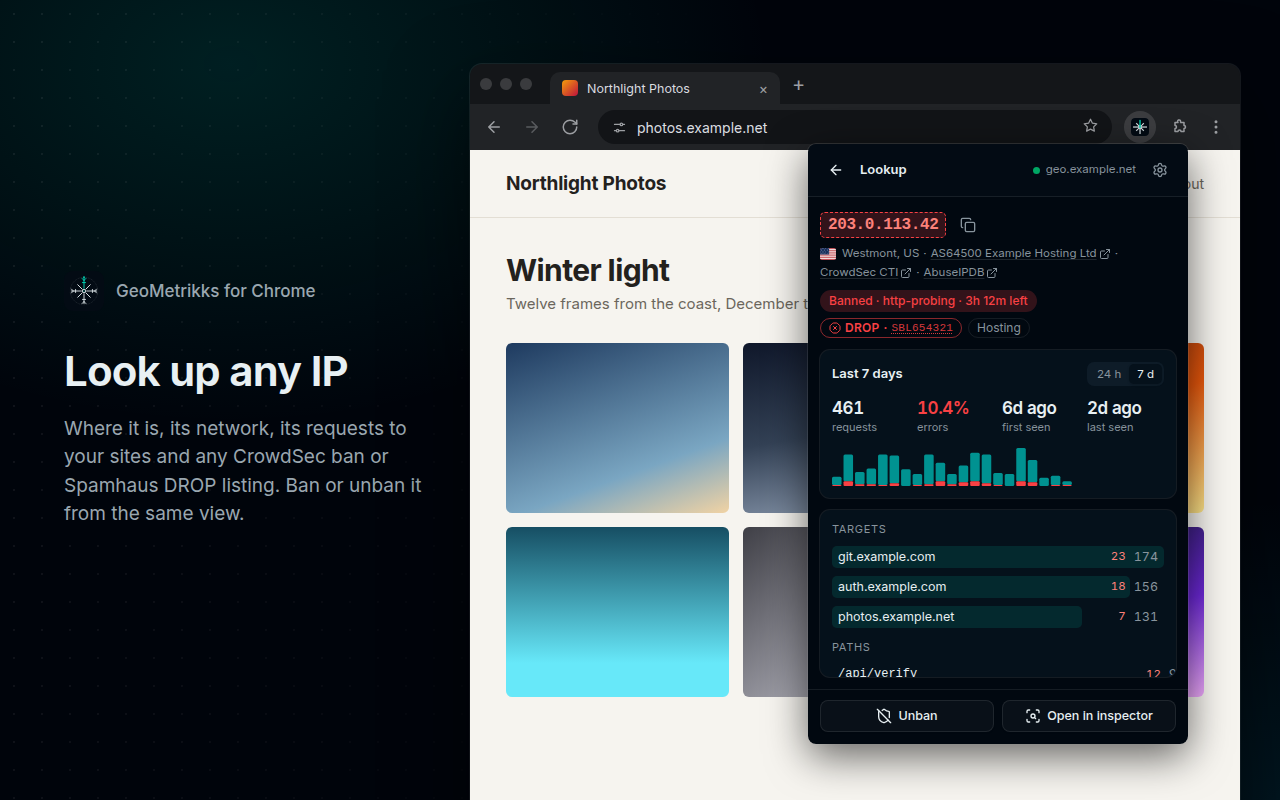
- GeoMetrikks for Chrome. A browser extension for your own GeoMetrikks server, installed from the Chrome Web Store (Edge users install it from there too) or from the zip attached to each GitHub release. Look up an IP from the toolbar popup, from selected text on a page, or by typing
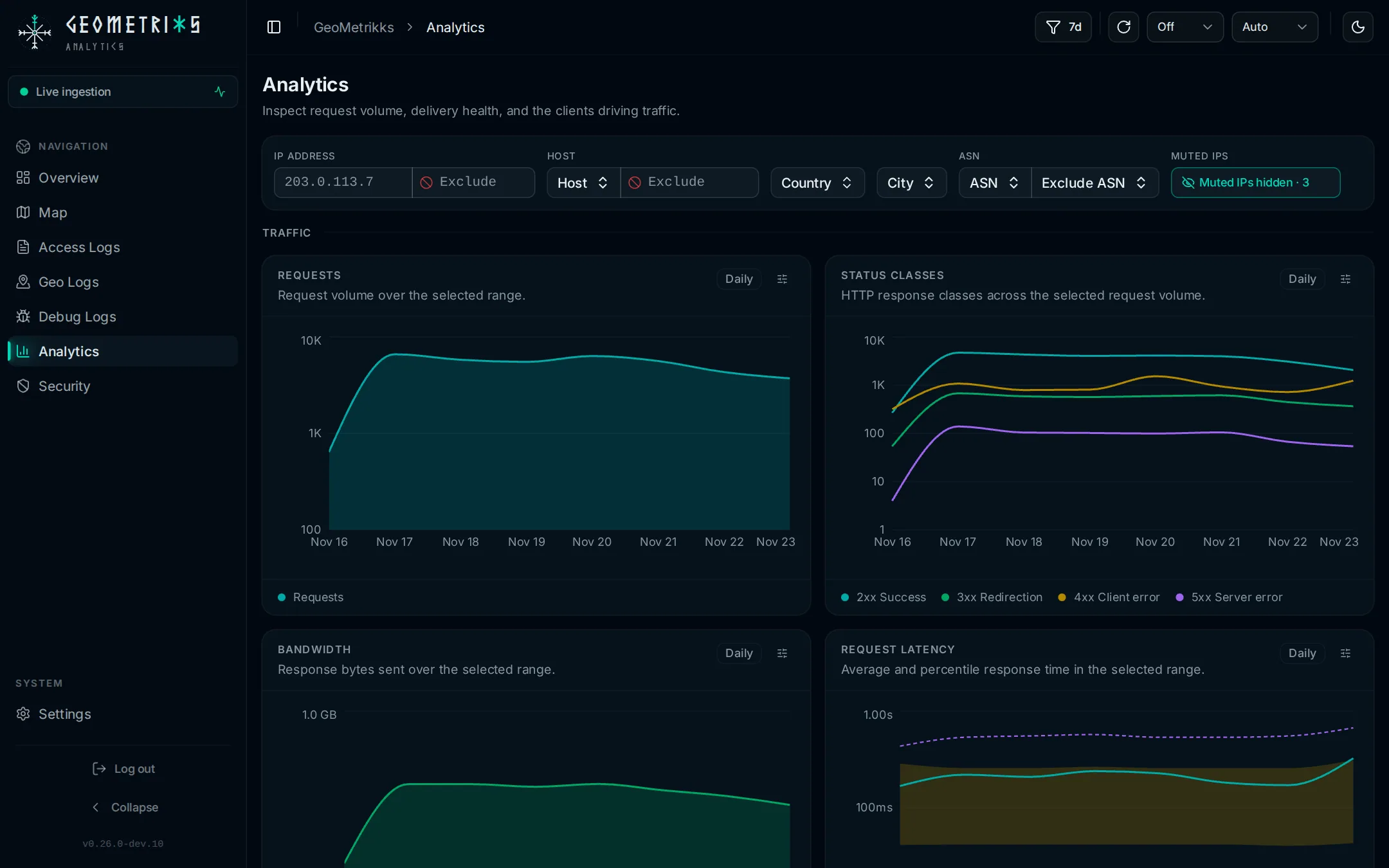
gmkand the IP in the address bar, and ban or unban it through CrowdSec without opening the app. On one of your own sites, the popup shows that host's traffic for the last 24 hours or 7 days and links to Analytics filtered to that host; it requires anhttps://server address. - Analytics host filter. Include or exclude hosts on the Analytics page across every chart and list, or filter from any host row's menu in Top URLs. Top IPs shows the total unique IPs in the view, and the Countries table shows error counts per country. The same
hostInandhostNotInfilters are available on the Analytics API endpoints. - CIDR ranges in IP filters. The IP address and Exclude IP filters on Access Logs History, Geo Logs and its map, and Analytics, along with the IP field on Debug Logs and the corresponding API parameters, now accept CIDR ranges alongside single addresses. Ranges must start on their network address, and IPv4 filters also match rows logged in IPv4-mapped IPv6 form.
- Faster CrowdSec views from the decision stream. CrowdSec badges, the map's Banned view, and the Security page's decision counts, list, search and banned DROP networks now read from the decision stream GeoMetrikks already polls instead of asking the LAPI for every decision on each load. With 40,000 blocklist decisions, Security page counts return in 0.12 s instead of 1.5 s.
- Failed scheduled jobs raise an advisory. When a scheduled job fails, the sidebar status turns to Attention until a run of that job succeeds, and failures on an agent appear under that agent's Problems on Settings > Agents. Jobs that run more often than every 10 minutes raise the advisory only after 10 minutes of failed runs.
- AbuseIPDB blacklist card on Settings > About. When the blacklist is on, Settings > About shows how many IPs it holds, when AbuseIPDB generated it, when it was last updated and the configured source. The status light turns amber after a failed download and red once the list is more than 72 hours old.
- Database TLS state on Settings > Agents. Each instance shows a lock in the list and a Connection row in its details indicating whether its database connection is encrypted and whether it verified the server certificate.
Muted IPs
Analytics host filter
GeoMetrikks for Chrome
Upgrade notes
Warning
Give GeoMetrikks its own CrowdSec bouncer API key in CROWDSEC_BOUNCER_API_KEY. The CrowdSec badges, map Banned view and Security page now read from the LAPI decision stream, and the LAPI tracks stream position per bouncer key. When another bouncer polls with the same key, changes it reads never reach GeoMetrikks and the active decision list can be wrong for up to 10 minutes until the next full reload.
- CrowdSec changes made outside GeoMetrikks can take up to
CROWDSEC_STREAM_POLL_INTERVALseconds (15 by default) to appear. The stream carries decisions in theIp,Range,CountryandASscopes only, so a decision in a custom scope such asusernameno longer appears in the Security page list or counts. - Scripts that check API error codes on
ipAddressIn,ipAddressNotInoripAddressnow receive400with codeinvalid_networkinstead ofinvalid_requestfor values that are not valid IP addresses or CIDR ranges without host bits set.
Changelog
Added
- Each entry on Settings > Muted IPs has a Show in Access Logs button that opens Access Logs History filtered to that address or range. Filtering by an IP turns muting off for that view, so the muted rows show there without changing the Muted IPs switch.
- The IP address and Exclude IP filters on Access Logs History, Geo Logs and its map, and Analytics take CIDR ranges such as
198.51.100.0/24or2001:db8:1:2::/64alongside single addresses, and so does the IP field on Debug Logs. A range must start on its network address. Typing198.51.100.7/24turns the field red and showsUse 198.51.100.0/24. An IPv4 address or range also matches rows logged in IPv4-mapped IPv6 form, such as::ffff:198.51.100.9, as Muted IPs does. TheipAddressIn,ipAddressNotInandipAddressAPI parameters take ranges too. They answer 400 with codeinvalid_networkfor a range with host bits set or a value that is not an address, which used to getinvalid_request. - Muted IPs stores a shared list of up to 20 IP addresses and CIDR ranges in the database, each with an optional note up to 100 characters, and hides them from Access Logs History, Geo Logs and Analytics with one switch while keeping every row stored. Manage entries under Settings > Muted IPs, or use Mute IP and Unmute IP from the IP actions menu on those three pages. The list is shared across every browser and device, while the switch is stored per browser and starts on by default. On desktop, the filter bar shows
Muted IPs hiddenwith the entry count orMuted IPs shown, and on a phone the switch sits in the Filters drawer and counts toward the Filters badge. Filtering by an explicit IP turns muting off so that address still appears. While muting is on, the Analytics request, status, bandwidth and latency charts, Top URLs, user agents, Top ASNs and Traffic Origin read raw rows and reach backANALYTICS_RAW_RETENTION_DAYSdays, as do the Geo Logs map and hourly Geo Logs charts on ranges over 30 days. The standalone Map, Overview, Debug Logs, the Access Logs live tail and the Geo Logs map popup's Top IPs, Unique IPs and Last hit figures don't mute. Scripts can manage the list throughGET /api/v1/muted-ips,POST /api/v1/muted-ipsandDELETE /api/v1/muted-ips/{id}, where Read keys can list entries and Read/write keys can change them, and passexcludeMutedIps=trueto the Access Logs, Geo Logs and Analytics endpoints. Muted IPs covers how it differs fromLOGPARSER_IGNORE_IPSand how IPv6 ranges behave. - Analytics can include or exclude hosts across every chart and list on the page. Excluding a host keeps requests that have no host. Each Top URLs row that has a host has a menu that filters by or excludes that host. Top IPs shows the number of unique IPs in the view, and the Countries table shows errors. A host filter reads the raw access log rows, so those charts and lists reach back only
ANALYTICS_RAW_RETENTION_DAYSdays, 180 by default, as the ASN filter already does. The one exception is Top URLs: with no other filter, it reads its hourly and daily aggregates for ranges over 24 hours, so it can reach as far back as those go. - A scheduled job that fails now raises an advisory, so the sidebar status turns to attention until a run of that job succeeds. A failed job on an agent shows under that agent's Problems on Settings > Agents. Jobs that run more often than every 10 minutes raise it only after 10 minutes of failed runs.
- Settings > About has an AbuseIPDB blacklist card when the blacklist is on. It shows how many IPs the stored list holds, when AbuseIPDB generated it, when it was last updated, and which source is configured, the API or a file. The light turns amber when the last download failed, and red once the list is more than 72 hours old and GeoMetrikks stops marking its IPs.
- Settings > Agents shows whether each instance's database connection is encrypted and whether the instance verified the server, with a lock in the list and a Connection row in its details. Multiple sources explains how to encrypt the link between an agent and the database with the standard
PGSSL*variables. At startup, the log names aPGSSL*file the app can't read. - Scripts can ask Analytics for one site's traffic.
GET /api/v1/analytics/time-series,top-ips,top-countries,top-cities,top-urls,top-user-agentsandtop-asnstake repeatablehostInandhostNotInparameters, matched exactly against the logged Host value.hostNotInkeeps lines that have no host. On every endpoint excepttop-urls, a host filter reads the raw access log rows, so those reach back onlyANALYTICS_RAW_RETENTION_DAYSdays.top-urlsalso reads raw rows for ranges of 24 hours or less and whenever a request sets any other filter. With only host filters on a longer range, it reads the hourly and daily aggregates. With more than one host inhostIn,top-urlsadds up each path across them and returnshostas null.top-ipsalso returnsdistinctIps, the number of client IPs in the range after filters, and eachtop-countriesrow haserrorHits.GET /api/v1/auth/connectionlistsanalyticsHostFilterincapabilitieson servers that take these parameters. - GeoMetrikks for Chrome, a browser extension for your own GeoMetrikks server. Look up an IP from the toolbar popup, from text you select on a page, or by typing
gmkand the IP in the address bar. Ban it through CrowdSec for 1 hour, 4 hours, 24 hours, 7 days or for good, or unban it, without opening the app. On one of your own sites, the popup shows that host's requests, unique IPs, error rate and top countries, paths and IPs for the last 24 hours or 7 days, and links to Analytics filtered to that host. A Read key gives a read-only popup. The extension needs the server on an https address, and site stats need this release. Edge users install it from the Chrome Web Store too. Each GitHub release carries the extension as a zip. GeoMetrikks for Chrome covers setup, authenticating proxies and servers with the login off.
Changed
- The CrowdSec badges and the map's Banned view now read the banned IPs from the decision stream GeoMetrikks already polls. Before, each load asked the LAPI for every decision, which took 750 ms or more with large blocklists. A change can now take up to
CROWDSEC_STREAM_POLL_INTERVALseconds, 15 by default, to show. Bans and unbans made in GeoMetrikks still show at once. Give GeoMetrikks a bouncer key of its own. When another bouncer polls the stream with the same key, the list can be wrong for up to 10 minutes. - The Security page's decision counts, decision list and search, and its banned DROP networks now read the decisions GeoMetrikks keeps from the decision stream. So does the decision count in
GET /api/v1/integration/summary. Before, each of them asked the LAPI for every decision. With 40,000 blocklist decisions, the counts and the summary come back in 0.12 seconds instead of 1.5, and an IP search in 1.2 seconds instead of 2.6. A change can take up toCROWDSEC_STREAM_POLL_INTERVALseconds to show, as on the badges. The stream carries decisions in the Ip, Range, Country and AS scopes only, so a decision in a custom scope such asusernameno longer shows in the list or counts. - Pages that mark AbuseIPDB blacklist IPs get the list faster. A reload within 5 minutes reuses the browser's copy instead of asking the server. After that, the browser asks whether the list changed, and the server answers in about 10 milliseconds when it hasn't. With 100,000 listed IPs, every fetch of the whole list took 0.8 seconds. Now the first fetch after the list changes or GeoMetrikks restarts takes about 0.45 seconds, and later fetches about 30 milliseconds. GeoMetrikks keeps the list in memory for this, about 1.3 MB per 100,000 IPs. When the list changes or expires, a page reloaded within those 5 minutes still shows the old marks until it fetches the list again, which it does no more than once an hour, as an open page already did.
- When the scheduled GeoLite2 refresh can't reach MaxMind, for example during a short DNS outage, it tries again after 30 seconds and again after 2 minutes before it reports the job as failed. The download at startup still makes one attempt.
Fixed
- Settings > About no longer loads slower the longer the server has been running. Every refresh of Settings > About or Settings > Status made later About loads slower, by about a third of a second after a day with Status open, and other requests waited while it ran.
- Opening an IP's sheet or menu no longer downloads the whole CrowdSec ban list again.
- Large responses come back faster when the browser reaches GeoMetrikks over plain http. The browser then asks for gzip, which the server now compresses at level 4 instead of 9. The CrowdSec ban list with 40,000 IPs took 236 ms to compress before and 55 ms now.
- Settings > Agents no longer says ingestion on an instance is not running for up to 30 seconds after the instance restarts. While it starts up, its Ingestion row reads Starting, and the instance reports in again as soon as ingestion runs.
- A missed run of a scheduled job no longer hides the error from the run before it on Settings > Scheduler.
- On the Security page, switching tabs no longer clears the other tabs' search, filters and page.
- A link to the Security page's DROP section opens on DROP instead of showing Decisions first.
- Searching AbuseIPDB reports for a whole IP finds only that address, not longer ones that start with it.
- The Analytics API's top lists (
top-urls,top-user-agents,top-asns,top-ips,top-countriesandtop-cities) count the right requests whenstartDateorendDatecarries a non-UTC offset. Before, they could skip requests near the start of the range, count requests near the end twice, and count requests made shortly after the end. It happened on ranges longer than 30 days with any non-UTC offset, for example+02:00, and on ranges over 24 hours and up to 30 days with an offset that isn't a whole number of hours, for example+05:30. The web app sends UTC times, so its counts were right.
What's Changed
- test(site): expect 0.25.0 as the latest docs in the smoke cases by @GilbN in #499
- docs(readme): show the live map like the docs introduction by @GilbN in #498
- Sync main with develop: README screenshot and site smoke cases by @GilbN in #500
- docs(screenshots): retake every screenshot from v0.25.0 by @GilbN in #501
- docs(abuseipdb): say how many checks the free plan gets and when a repeat lookup costs one by @GilbN in #506
- chore(lint): lint the backend with ruff in CI by @GilbN in #508
- build(frontend): move to Vite+ and lint with Oxlint in CI by @GilbN in #509
- style(frontend): format with Oxfmt and check formatting in CI by @GilbN in #510
- chore: skip the ruff and Oxfmt commits in git blame by @GilbN in #511
- test(browser): tap the Geo Logs point where the map draws it by @GilbN in #512
- feat(agents): show whether each instance's database connection is encrypted by @GilbN in #502
- fix(security): keep each tab's search and filters when switching tabs by @GilbN in #503
- feat(scheduler): show failed jobs in the sidebar and retry GeoLite2 downloads by @GilbN in #513
- fix(agents): stop warning that ingestion is down while an instance starts by @GilbN in #514
- feat(abuseipdb): show how current the blacklist is on Settings > About by @GilbN in #515
- perf(crowdsec): answer the banned-IP list from memory instead of the LAPI by @GilbN in #516
- perf(abuseipdb): cache the blacklist in the browser and answer it in 0.45 s instead of 0.8 s by @GilbN in #517
- perf(abuseipdb): serve the blacklist from memory and revalidate it in 11 ms with an ETag by @GilbN in #518
- perf(crowdsec): answer Security page counts in 0.13 s instead of 1.5 s from the decision stream by @GilbN in #519
- feat(extension): look up and ban IPs and see your site's traffic from Chrome by @GilbN in #520
- fix(analytics): stop top lists miscounting ranges sent with a non-UTC offset by @GilbN in #521
- docs(extension): name extension@geometrikks.dev as the store and privacy contact by @GilbN in #522
- docs(operate): explain the TimescaleDB worker pool the compose file sets by @GilbN in #523
- docs(extension): add the Chrome Web Store screenshots and promo tiles by @GilbN in #524
- feat(analytics): narrow every Analytics card to one site with a Host filter by @GilbN in #525
- feat(logs): hide your own traffic with a saved Muted IPs list by @GilbN in #526
- fix(muted-ips): reject a mistyped range instead of quietly widening it by @GilbN in #531
- fix(system): stop Settings > About slowing down the longer the server runs by @GilbN in #532
- feat(filters): take CIDR ranges in the IP and Exclude IP filters by @GilbN in #533
- feat(muted-ips): open Access Logs filtered to a muted entry from its row by @GilbN in #534
- fix(screenshots): build the screenshot bundle with vp so the tool runs again by @GilbN in #535
- fix(screenshots): refuse a run up front when Playwright's Chromium is missing by @GilbN in #536
- feat(screenshots): add a Muted IPs scene and show it on the Muted IPs docs page by @GilbN in #539
- chore(release): 0.26.0 by @GilbN in #537
- Release v0.26.0 by @GilbN in #540
Full Changelog: v0.25.0...v0.26.0