
I am excited to bring you a new update that is all about image quality, precision color science, and complete workflow freedom. This release tackles core photography fundamentals from the ground up, introducing a camera-accurate Kelvin white balance engine with interactive area sampling alongside an edge-aware guided filter architecture. By replacing conventional blurs with this smarter system, adjustments like clarity, shadows, highlights, and a completely re-engineered whites slider now preserve delicate micro-textures without ever creating unnatural halos around high-contrast edges.
Beyond raw rendering quality, this update brings massive quality-of-life upgrades to your daily editing routine. You can now cull shoots in record time using dedicated Pick and Reject flags, tailor the sidebar to your exact habits with fully reorderable and collapsible panels, and take advantage of Apple’s Neural Engine-powered RAW 9 decoder on macOS. I'm also introducing RapidRAW Cloud for effortless, remote GPU generative cleanups without local hardware demands, balanced by a one-click AI-Free Mode for photographers who want a purely traditional, distraction-free editing workspace.
This update completely overhauls how the app handles color temperature, turning white balance into a precise, camera-grade tool. In earlier versions, adjusting temperature and tint relied on rough guesswork sliders and a basic eyedropper that merely sampled a single screen pixel, often leading to uneven or unnatural color shifts.
RapidRAW now reads the white balance recorded by your camera in RAW files and lets you toggle into true Kelvin temperatures, ensuring that light adjustments behave just like real-world daylight or warm indoor lamps. Alongside this, the eyedropper tool has been completely redesigned: as you move across the canvas, a floating preview card displays live color readings, and you can now click and drag a box over any neutral gray or white area to smooth out image noise and calculate the correct balance automatically. Together, these changes make neutralizing unwanted color casts and dialing in the perfect photographic mood both effortless and true to life. Fine detail enhancements no longer produce distracting halos. In place of standard blurs, clarity, structure, dehaze, shadows, and highlights now run through an edge-aware filtering system that cleanly separates broad lighting changes from sharp object contours. When lifting dark shadows or taming highlights, the software captures original surface micro-textures and feeds them back into the picture. Textures like skin, fabric, and foliage stay crisp and authentic rather than muddying together.
Previously, the whites slider simply boosted areas with a flat multiplier, which easily blew out highlights and erased delicate textures. Now, it applies a smooth, targeted curve that brightens the lightest tones while directly reinjecting fine surface details and mid-level textures back in. As a result, bright areas like clouds, snow, or white clothing gain extra brilliance and pop without turning into flat, featureless patches.
Culling large shoots is now significantly faster thanks to a dedicated flagging workflow. You can mark favorites as "Picked" or bad takes as "Rejected" using quick keyboard shortcuts, visual badges, or bottom bar toggles. Rejected photos automatically dim in your library, making it easy to filter them out of view or delete all of them at once with a single confirmation. Mac users can now tap directly into Apple’s advanced RAW 9 engine. Designed to take full advantage of the Neural Engine, this system demosaics camera sensor data and cleans up image noise in a single unified step. You can enable this engine in the RapidRAW processing settings as your default RAW developer, or pick it inside the Denoise menu. Unsupported cameras or file types seamlessly fall back to the built-in processor without interrupting your workflow.
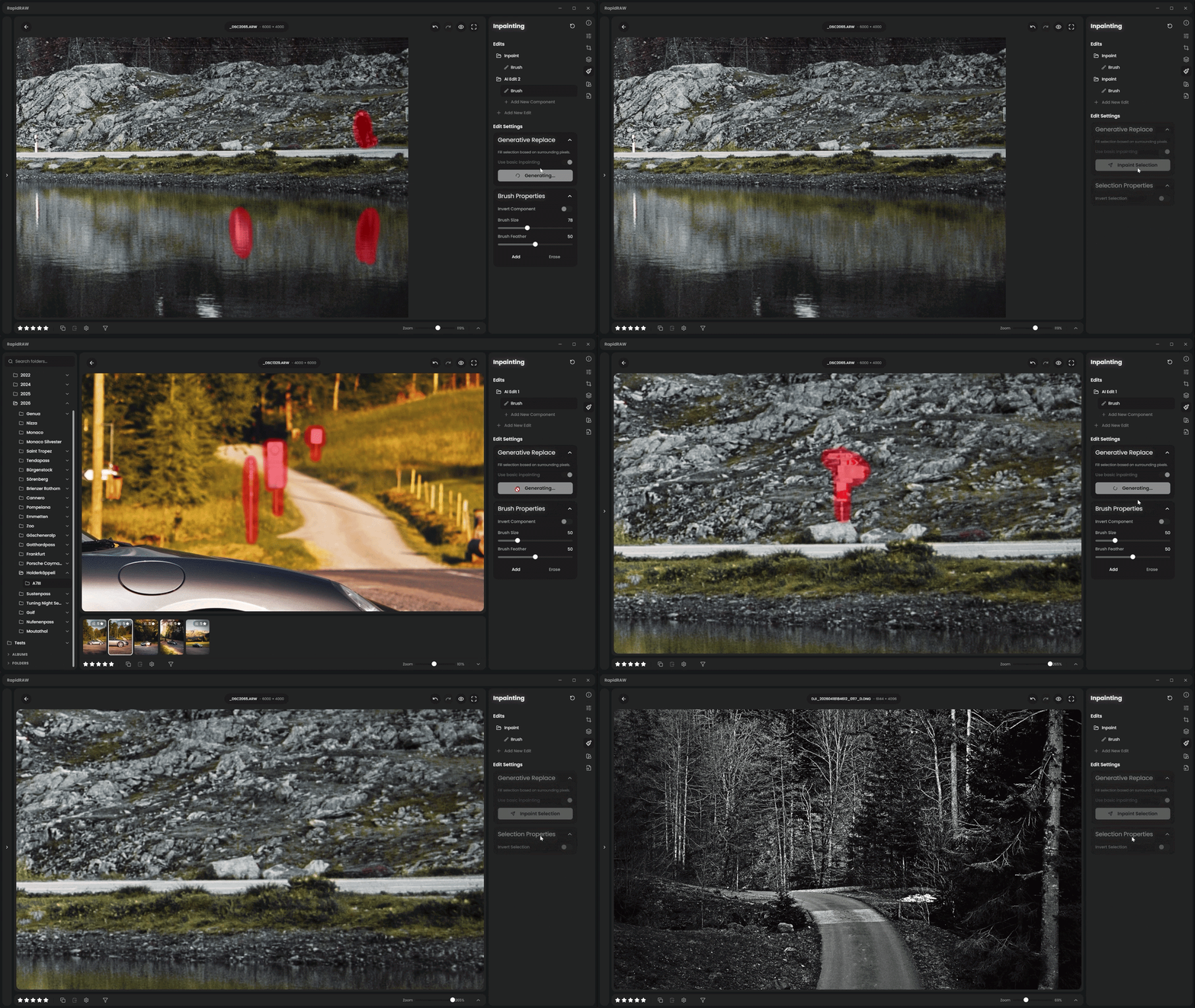
RapidRAW is built on the belief that great photo editing should never be locked behind a paywall. The entire editor, its full RAW processing engine, smart masking, and built-in spot removal tools remain 100% free and run privately right on your own computer. If you have a dedicated graphics card and enjoy managing your own setup, you can even connect your own local server to run advanced generative tasks without paying a single cent. You have total freedom over how you edit, and nothing you already use is being restricted or hidden away. For those who simply want effortless object removal without buying an expensive graphics card or wrestling with technical installations, RapidRAW Cloud is here purely as a convenience. With a quick sign-in, remote servers handle the heavy lifting for complex textures and large removals - only processing the small patch you brush over and deleting it immediately, so your full RAW files never leave your computer. At $14 a month, it is an easy, zero-hassle upgrade that gives you remote editing when you want it, while directly funding independent, open-source development without venture capital, bloat, or ads.
As this is the initial rollout of RapidRAW Cloud, your early feedback is crucial! Whether it's processing speed, inpainting quality, or workflow suggestions, please share your thoughts via GitHub, Email or Discord so I can continue refining the experience.
Learn more at: https://www.getrapidraw.com/cloud For photographers who prefer a purely traditional workflow or need to follow strict photo contest rules, RapidRAW includes a dedicated AI-Free Mode. Flipping this single switch completely hides all generative buttons, AI masks, and neural tools, automatically reverting features like noise reduction back to classic algorithms. Your existing edits will still display normally, leaving you with a clean, distraction-free workspace focused entirely on authentic photography. Your editing workspace is now completely modular. You can drag and drop to reorder entire sections and individual tools, hide controls you rarely touch, and collapse items to save vertical space. The app automatically remembers your preferred arrangement and open sections, keeping your workspace clean, organized, and tailored to how you work. You can now save your favorite custom crop aspect ratios as permanent presets. After typing in any unique width and height, clicking the save icon adds it directly alongside your standard crop buttons with an automatically formatted label. These custom ratios stay saved across all your editing sessions, and you can remove them anytime with a single click.
A huge amount of community effort went into making this release possible. While I was away on a one-week road trip through Austria, several amazing contributors stepped up to keep the momentum going, with a special shoutout and massive thank you to @lalibertemarc for their exceptional help, dedication, and consistently high-quality contributions across this release cycle.
Due to the introduction of the new camera-accurate Kelvin white balance engine and updated tint shaders, white balance handling has changed significantly. As a result, existing edits opened in v1.6.5 may appear slightly different, potentially shifting more magenta or greenish compared to previous versions as they map to the new, physically accurate color pipeline.
Recommendation: If you are in the middle of editing an active client shoot or critical project, I strongly recommend finishing and exporting your work on your current version before upgrading. Once your current shoot is wrapped up, upgrade to v1.6.5 to take full advantage of the improved color science for your next projects.
Thank you for your understanding!
New Features
Kelvin White Balance with Area Sampling


Guided Filter for Edge-Aware Adjustments
Original
Before (Visible Halos)
After (Edge-Aware)


Rewritten Whites Slider
Pick and Reject Flags

Apple RAW 9 Decoding and Denoising Support
RapidRAW Cloud Integration

AI-Free Mode

Reorderable and Collapsible Adjustment Panels

Savable Custom Aspect Ratios
Core Improvements
Community & Acknowledgments
Note for Upgrading Users
What to Download
| OS | Architecture | Format | Download Link |
|---|---|---|---|
| Windows | x64 | .exe
| RapidRAW for Windows |
| macOS (Apple Silicon) | ARM64 | .dmg
| RapidRAW for macOS ARM |
| macOS (Intel) | x64 | .dmg
| RapidRAW for macOS x64 |
| Ubuntu 22.04 | x86_64 | .deb
| RapidRAW for Ubuntu 22.04 |
| Ubuntu 24.04 | x86_64 | .deb
| RapidRAW for Ubuntu 24.04 |
| Android | ARM64 | .apk
| RapidRAW for Android (v1.6.4) (⚠️ v1.6.5 currently crashes on launch. Please use v1.6.4) |
Download Tethering Builds & Setup Guide (macOS & Linux)
1. Install libgphoto2 on your machine
RapidRAW uses libgphoto2 to communicate directly with connected cameras over USB. Because the tethering binary links dynamically against this library to stream live view and control camera settings, the driver must be present on your system for the app to detect and control your camera.
-
macOS (via Homebrew):
brew install libgphoto2 pkg-config
-
Ubuntu / Debian:
sudo apt update && sudo apt install -y libgphoto2-dev pkg-config -
Arch Linux:
sudo pacman -S libgphoto2 pkgconf
-
Fedora:
sudo dnf install libgphoto2-devel pkgconf-pkg-config
2. Download Tethering Build
| OS | Architecture | Format | Download Link |
|---|---|---|---|
| macOS (Apple Silicon) | ARM64 | .dmg
| RapidRAW for macOS ARM (Tethering) |
| macOS (Intel) | x64 | .dmg
| RapidRAW for macOS x64 (Tethering) |
| Ubuntu 22.04 | x86_64 | .deb
| RapidRAW for Ubuntu 22.04 (Tethering) |
| Ubuntu 24.04 | x86_64 | .deb
| RapidRAW for Ubuntu 24.04 (Tethering) |
(Note: Windows and Android are not supported for camera tethering due to OS driver limitations).
For other platforms and formats (ARM builds, RPM, AppImage, etc.), check the full asset list below.
Running on Windows and macOS
RapidRAW is not yet code-signed, so Windows and macOS may show warnings when launching the app.
-
Windows: When launching the app, you may see a Windows Defender SmartScreen warning.
- Click "More info" → "Run anyway" to proceed.
-
macOS: You'll need to remove the quarantine flag after installation, otherwise macOS may report the app as corrupted:
xattr -dr com.apple.quarantine /Applications/RapidRAW.app