

R1.0.0 Stable - Reference-Grade Dolby Vision and LLDV now stable
R1.0.0 is the first stable release of LibreELEC × CB1. It delivers state-of-the-art Dolby Vision fidelity in both TV-led and player-led (LLDV) modes, alongside calibrated HDR and SDR rendering tailored to your display’s characteristics. It also improves Blu-ray menu playback, lets you switch rendering modes on the fly, and adds new upscaling options including FSR.
Downloads
- New installation — write the Generic x86-64
.img.gzto a USB drive with LibreELEC USB-SD Creator. - Existing LibreELEC × CB1 installation — place the matching
.tarin the Update share or/storage/.update, then reboot. - Verification — see
SHA256SUMSin Assets. Both files contain the same tested build. Build source
What's new since RC3
- Native Dolby Vision LLDV Reference - CB1 reads the display's target brightness, black level, and color primaries from its EDID. The HDMI format selector shows which formats are available, explains why others are unavailable, and labels experimental modes. LLDV display targeting
- Calibrated SDR conversion and HLG to Dolby Vision - Convert Dolby Vision, HDR10, HDR10+, or HLG to SDR with Reference, Bright room, or Custom / Projector targets. SDR defaults to BT.709, with BT.2020 available on compatible setups. HLG gains a Dolby Vision rendering option alongside native playback. HLG to SDR · BT.2020 SDR
- Improved AV1 playback - Playback resumes more reliably after seeking, including with software decoding. Supported inputs also include 10-bit Dolby Vision in AV1. RC4 notes
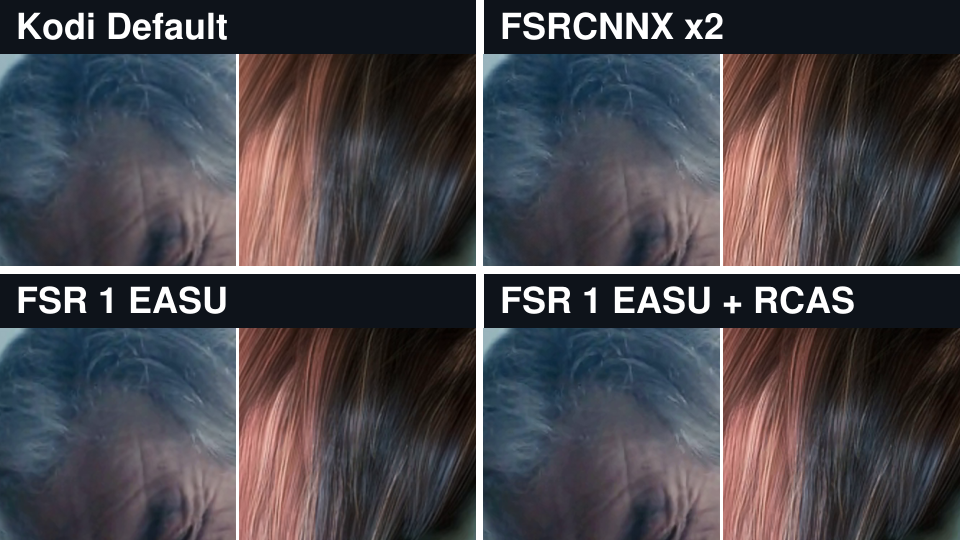
- New video upscalers including FSR - Choose separate filters for 1080p and above and below 1080p, based on the source resolution. Both menus default to Kodi Default and offer the same filters for SDR, HDR, and Dolby Vision, including FSR 1 with or without RCAS, FSRCNNX x2, and Anime4K Fast. Player Information shows the active filter when the picture is upscaled. Upscalers
- Better Blu-ray and UHD Blu-ray ISO playback - More reliable HDMV and BD-J navigation, including animated menus, chapters, extras, and audio and subtitle selection. On supported transitions, the player maintains HDMI output and PCM audio to reduce interruptions. Blu-ray transitions
- New Player Information panel and per-format defaults - Press
Oto see the source, the processing applied, and the HDMI output. Each file starts with the default circuit for its input format. Quick Switch lets you change circuits during playback and explains why an option is unavailable. Thanks to CorentinB for the three-column redesign. Player Information - Smoother playback with overlays open — improved frame pacing on tested HDR10 conversion and native LLDV paths when using Player Information or playback controls. HDR10 cadence · LLDV overlays
- More reliable HDR playback and HDMI switching - Faster signal recovery on Intel when switching from Dolby Vision to HDR10 or SDR, improved HDR10+ frame pacing, and a fix for the recurring stutter observed on the True Black sample. RC4 Preview Update 4
- Broader hardware and audio compatibility - Improved boot and 10-bit HDR10 output on NVIDIA GTX 10-series cards, experimental TV-led Dolby Vision on RX 550 Polaris12 at UHD 23.976 Hz, and Intel Xe3 display fixes. Adds CEC detection on compatible setups, HDMI range and bit-depth settings, and optional Dialnorm neutralization for audio passthrough. GTX 10-series work adapts code from LibreELEC Hades by hadesdevls. Dialnorm adapts CoreELEC p3i work by pannal. RC4 notes · Dialnorm
- Clearer diagnostics - Kodi explains why a circuit cannot start and lets you adjust how much detail CB1 logs. The installer saves logs from the current and previous boot to the USB drive. Playback diagnostics · CB1 logging
What's next?
I'll focus on fixing bugs and reviewing feature requests for future updates.
Report a bug or performance problem
- In Kodi, go to Settings → System → Logging and enable debug logging.
- Reproduce the issue, then open Settings → LibreELEC → System → Submit Log. Choose Upload latest Kodi log and configs, and view the short URL. If Kodi crashed, upload the latest crash log from the same menu.
- Paste the short log URL into your report. Include your build version, GPU, TV or projector, HDMI setup, source format, selected circuit, and steps to reproduce. Open a bug report
- Turn off debug logging once you’ve shared the log.
Suggest a feature
Send your suggestion through the private form. Describe what you would like to do, what is missing today, and how the change would help. An email address is required so we can reply and keep you informed about your suggestion.
| Player Information | Quick Switch | Read and display HDMI Dolby Vision EDID | Upscaler comparison |
|---|---|---|---|

| 
| 
| 
|