
BluetoothHandsFreeToggle is now StereoKeeper. It is the same free, open-source app under a new name, and it now lives in the system tray instead of a console window.
When a game, Discord or a browser turns on the microphone of your Bluetooth headphones, Windows switches them to call mode (HFP), and the sound becomes muffled and mono. StereoKeeper shows when that happens and brings stereo back in one click.
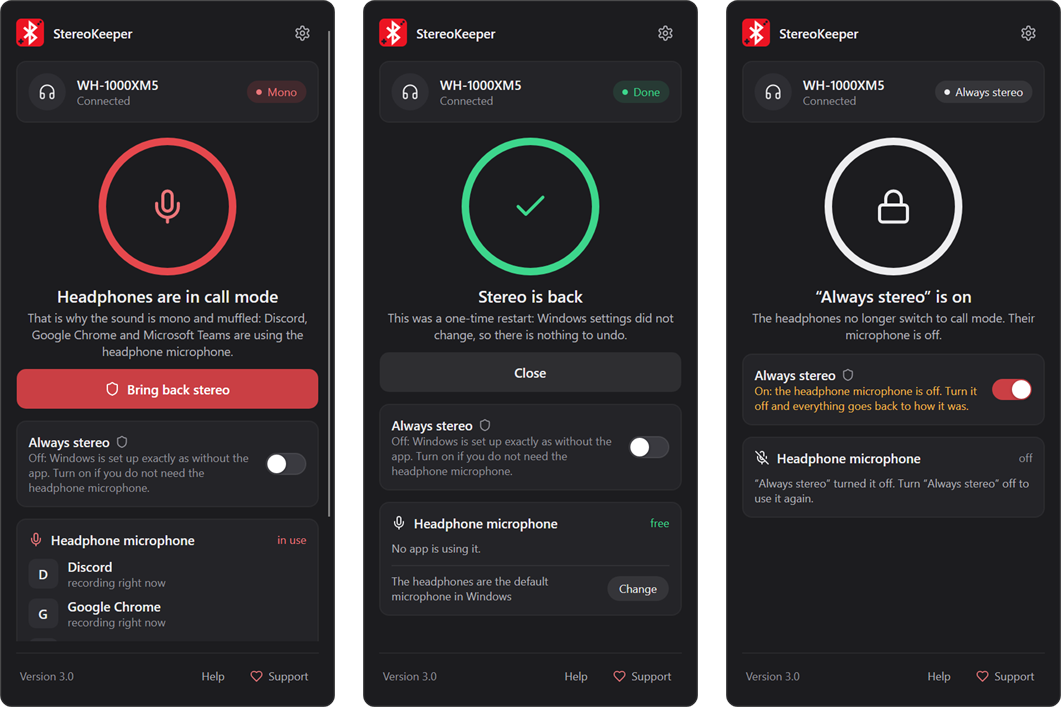
What's new
A tray app instead of the console
- Click the tray icon to see whether your headphones play in stereo or are stuck in call mode. The dot on the icon shows the same at a glance.
- The panel names the apps that hold the headset microphone, for example "Discord is using the headphone microphone", and warns you when the headset is the default Windows microphone.
- Bring back stereo (formerly Soft reset) ends call mode with one click. Windows settings stay as they are, and the headset microphone keeps working.
- Always stereo (formerly Hard mode) is now a switch. It keeps the headphones out of call mode while you use another microphone. Turning it off puts Windows back exactly as it was.
- Every action shows its steps in plain words while Windows restarts the services. If something goes wrong, the panel explains what to do next.
Everyday comfort
- Optional Windows notifications when the headphones switch to call mode or an app turns on their microphone.
- Settings for starting with Windows, the language and notifications.
- Built-in help in all 30 languages: why the sound gets worse, what each button changes, and how to undo everything before uninstalling.
- Copy info for the developer in Settings copies the app and Windows version, the headphone mode and the error log for a bug report, with your user folder hidden.
Light and safe
- About 25 MB of memory in the tray, near-zero CPU and no GPU use, so games keep the whole graphics card.
- The download shrank from 42 MB to 21 MB.
- The panel runs without administrator rights. Windows asks for permission only when you click Bring back stereo or flip Always stereo.
- If the panel ever cannot start, Windows shows the reason. With Always stereo on, it offers to put Windows back first.
Removed
- The console menu and the command-line mode.
- The WinGet command
bhft. After the update, runstereokeeperinstead.
Updating from 2.x
- WinGet:
winget upgrade OlimoffDev.BluetoothHandsFreeToggle. The package ID keeps the former name, so existing installations update as usual. The new version can take a few days to appear in WinGet. - Manual download: replace the old
.exewith the new one. - If Hard mode was on, StereoKeeper shows Always stereo as on, and turning it off restores the Windows state saved by 2.x.
- Your language choice is kept.
Downloads
| File | For |
|---|---|
StereoKeeper-v3.0-win-x64.exe
| Most Windows PCs (Intel and AMD) |
StereoKeeper-v3.0-win-arm64.exe
| Windows on ARM (for example Snapdragon laptops) |
SHA256SUMS.txt
| Checksums of both files |
It is a single self-contained file with no installer and no .NET to install. Put it in a folder you keep before you turn on Start with Windows.
dfa6a594ed4aba346bace829d60bdf39e8f11f4037cb59232f57db39416f803e  StereoKeeper-v3.0-win-x64.exe
dc33a523a477a734b081513e640c647ea2bb56613862043266f2cf34717da1de  StereoKeeper-v3.0-win-arm64.exe
Requirements
- Windows 10 version 2004 or later, or Windows 11
- Administrator permission only for Bring back stereo and Always stereo