
中文 | English
中文
OxideTerm 2.3.0 的首要更新是终端内存改造:重新设计历史存储,减少搜索临时分配,并回收后台标签页和图片的闲置缓存。这一版还扩展了 Kitty 与 Sixel 图形支持,加入 BLE 蓝牙终端,并改进大文件编辑、Markdown 预览和 SFTP 文件操作。
⚡ 终端内存大幅降低
两万行满行历史,从 196.47 MB 降到 15.50 MB
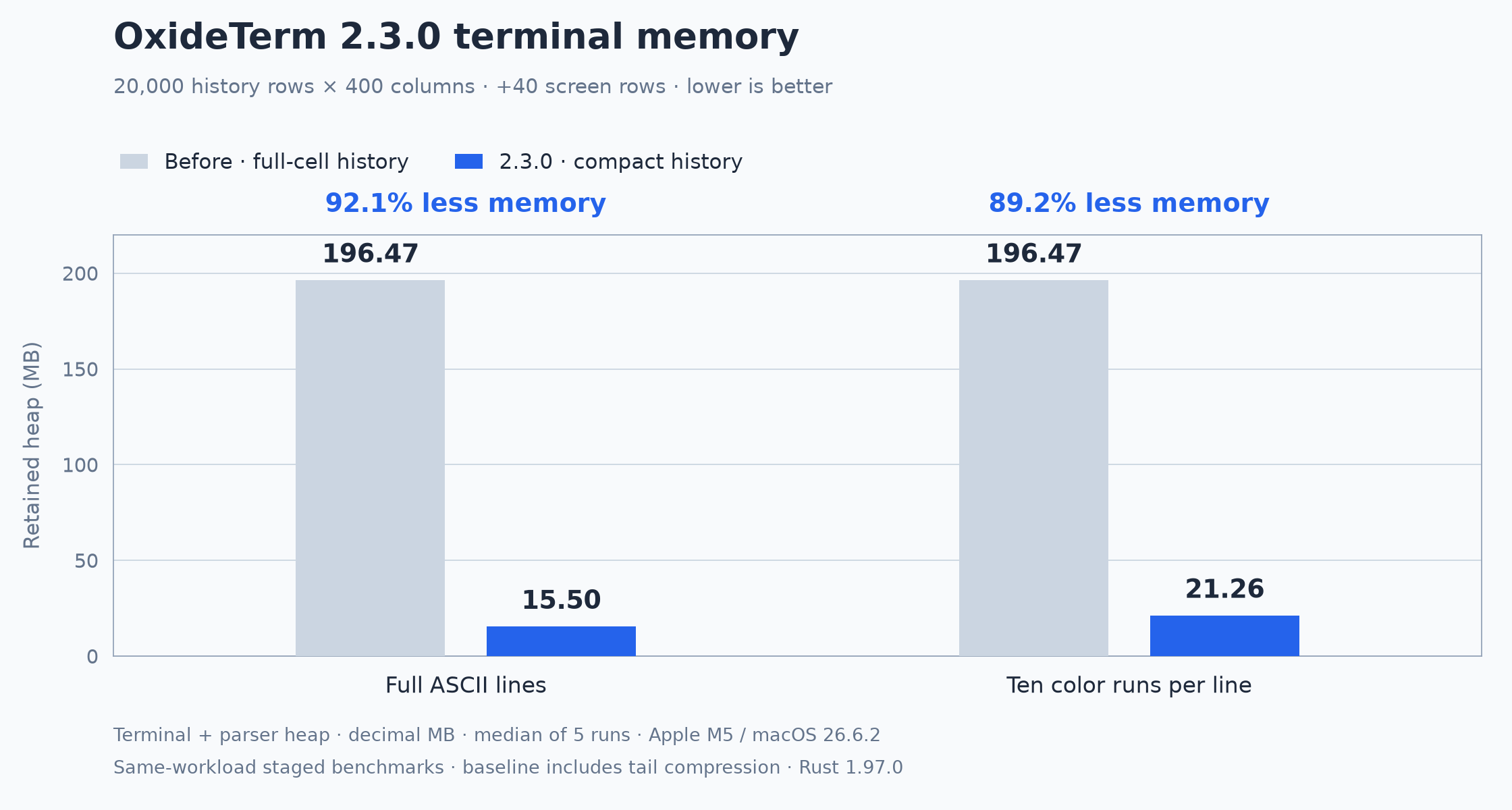
以前,满行历史中的每个字符都要保存一份完整颜色和属性。现在,普通历史行把文本与样式分开保存,相邻文字共享样式;即使每个字符都不同、整行都写满,也能省下大量内存。
在 20,000 行历史 × 400 列,另含 40 行屏幕的相同工作负载中:
| 满行文本场景 | 完整单元格基线 | 本版紧凑历史 | 降幅 |
|---|---|---|---|
| 普通 ASCII 文本 | 196.47 MB | 15.50 MB | 92.1% |
| 每行十段着色 | 196.47 MB | 21.26 MB | 89.2% |
数据来自本轮分阶段基准,完整单元格基线已包含尾部压缩。测量范围是终端与解析器的堆分配,MB 使用十进制;完整环境和各阶段结果见终端基准。
重复尾部继续压缩;样式变化频繁的行按存储成本选择 8 字节紧凑单元格或完整单元格。宽字符、组合字符、超链接和颜色信息保持完整。搜索和复制直接读取紧凑历史,避免为了读取而把整份历史展开。
搜索时少复制,多开终端时及时回收
- 搜索共享文本快照,并压缩复杂 Unicode 和跨行匹配的位置记录。在中文与组合字符的正则命中基准中,位置映射优化将额外峰值堆占用从 119.79 MiB 降至 74.13 MiB。
- 隐藏的终端标签页释放字形排版、绘制、高亮和链接布局缓存,重新显示时再构建。会话、选区、滚动位置和搜索状态继续保留。在 8 个终端、其中 7 个隐藏的基准中,额外堆分配从 60.02 MiB 降至 35.25 MiB。
- 静态终端图片共享像素,多个放置不复制整张图片。图片淘汰时同步释放后台持有的数据,隐藏终端释放派生渲染缓存;动图继续复用完整帧,避免用反复解码换取更低的缓存占用。
✨ 图形与设备新功能
Kitty 与 Sixel:图片跟随文本,动画复用完整帧
- Kitty 加入 Unicode 占位符、虚拟放置和相对定位。图片可以跟随占位文本或父图片移动,主屏与备用屏切换、局部滚动、窗口重排和历史裁剪也会同步更新图片位置。
- Kitty 动画支持帧合成、局部更新、透明混合、循环次数、暂停与继续、加载等待和帧删除。播放复用完整解码帧,到下一帧实际需要显示时才刷新。
- Sixel 图片随正文滚动、重排和清理。文字覆盖或擦除时,只清除对应的图片区域;插入、删除字符时,相应图片部分跟着移动。tmux 分屏中的图片保持原始尺寸,并裁剪在所属面板内。
- 修复 Retina 等高分屏上图片被放大、裁掉一部分或像素偏移错误的问题;Kitty 图片到达屏幕底部时也不再盖住后续提示符。
新增 BLE 蓝牙终端
授予系统蓝牙权限后,可以扫描适配器和附近设备、查看 GATT 服务,再连接 Nordic UART Service 或具有兼容通知/写入特征的自定义服务。(PR #731)
- 支持文本和十六进制收发,可分别设置发送、接收换行,并配置本地回显、MTU 和写入方式。连接可以保存、编辑和重连,也支持云同步与加密
.oxide导入导出。(PR #731) - 新建连接时可以选择分组,已有 BLE 配置也能在会话管理器中移动分组。(PR #735)
- 改善设备身份匹配,同名设备无法区分时会给出提示。取消扫描或连接后,过时的结果不会再打开会话;关闭连接会清理通知订阅和设备连接。(PR #731)
🛠️ 功能详情与修复
终端交互修复
- 本地终端在后台回复光标、颜色和窗口尺寸查询,不再等待界面处理,修复程序等待响应以及响应内容混入 Shell 输入的问题。SSH 终端也能回复像素尺寸查询。(Issue #733)
- 串口文本模式会正确解析 Shell 标记、工作目录等有效 OSC 序列,不再把它们显示成普通文字;异常启动输出的处理仍然保留。(Issue #732)
大文件编辑与 Markdown 阅读
- 编辑、撤销、保存和语法分析共享分块文本,减少整份文件的复制。批量编辑一次更新文本结构,删除大片内容时复用原有存储来保存撤销信息。
- 搜索在后台执行,文本扫描不再占用界面线程,匹配范围也使用更紧凑的存储。百万匹配专项基准中的额外堆占用从 16.00 MiB 降至 4.78 MiB。
- 超长行增加水平可见区的分段排版,折行和折叠使用紧凑行映射。后台编辑器释放排版、高亮和语法树缓存,未保存正文、撤销历史与滚动位置继续保留。
- IDE 中的
.md文件默认进入预览,可一键切换到源码。预览支持鼠标选择、跨段落复制和全选,复制得到阅读文本。切回编辑时保留焦点、未保存内容和撤销记录。(PR #726) - Markdown 预览共享解析结果,用高度索引定位可见内容,减少滚动长文档时的重复遍历。IDE、本地文件和 SFTP 预览都会复用未变化内容的解析结果,在切换模式或关闭后释放不再使用的缓存。
10,000 段 Markdown 的额外布局内存从 6.26 MiB 降至 0.31 MiB,测量不含原始正文、解析树、字形和图片。编辑器与 Markdown 的对比条件见编辑器内存记录。
图片传输与资源限制
- Kitty 支持分块上传、压缩载荷、图片编号与多处放置,以及裁剪、像素偏移、层级和多种删除条件。同一图片的多个放置共享数据。
- Kitty 文件与共享内存传输可在会话授权后直接访问本地资源,无需使用私有传输目录。可从终端菜单提前授权,也可在请求被阻止后授权并重试。该权限也适用于会话中的远端程序,关闭或重连后失效;直接传输图片数据不需要这项权限。
- Sixel 解码先检查完整画布和内存预算,再一次分配所需空间。支持像素比例、颜色寄存器、透明背景、能力与尺寸探测,以及固定显示和随文本滚动两种模式。
- 默认质量档的每终端图片保留预算提高到 256 MiB,随图片传入按需占用。终端图片、解码与上传缓冲、背景图片共用 512 MiB CPU 图片预算,GPU 存储另计。单帧和像素数量限制仍然生效,低功耗与兼容档保留较小预算。
图片、知识库与后台内存
- 图片按显示尺寸解码,放大或移到高分屏后再加载更清晰的版本。PNG、JPEG、背景图和旋转预览的解码路径都做了调整,降低首次打开大图片的内存峰值。
- 默认图片缓存按字节占用清退闲置内容,关闭 SFTP 预览后释放相应资源。CPU 像素与上传数据减少重复副本,空闲界面内存池也会回收多余容量。
- 动图加载时解码并缓存完整帧,播放时直接复用;可见动画复用已上传帧,隐藏后停止无效刷新并释放相应纹理。
- 聊天历史、知识库和传输进度数据库改用较小的页缓存预算。知识库切到后台后释放可重建缓存,统计信息不再每次绘制都扫描向量。向量索引构建减少数据复制,保存和加载改为流式处理,并限制解压大小。
- WSL 图形桌面减少一份完整 CPU 帧副本,降低高分辨率桌面的驻留内存。
SFTP 与会话管理
- SFTP 侧边栏可以切换列表或目录树,按需展开子目录,并记住视图偏好。目录树会处理符号链接循环,右键操作使用选中条目的完整路径。(PR #729)
- 可以把 SFTP 选中目录同步到对应终端,终端忙碌时会提示。将文件拖入 SSH 终端,可通过对应连接上传到该终端的当前目录。(PR #729)
- 路径书签保存一组本地与远端目录,支持重命名、删除和按连接管理;远端到远端标签页不提供路径书签。(PR #729)
- 上传和文件选择流程会检查目标连接、目录是否已经变化,防止切换页面后仍向旧目标上传。(PR #729)
- 活动 SSH 会话按主机和用户分组,显示已保存连接的名称,并区分端口和跳板路径,方便辨认同一主机上的不同会话。(PR #727)
SSH、云同步与配置
- SSH 协议依赖升级到 russh 0.65.0,保留 OxideTerm 的既有补丁,并更新依赖锁和 Nix 源码配置。
- Windows 启动 SSH
ProxyCommand辅助程序时,不再弹出额外控制台窗口。(PR #730) - 修复阿里云 OSS 的 S3 兼容寻址,支持官方 S3 端点、原生 OSS 端点及已包含同一存储桶名称的端点。使用说明补充区域、权限和 STS Session Token 配置。(PR #725)
- 同步独立连接配置时,预览和实际传输都会遵循用户选择的删除记录,覆盖上传、下载及
.oxide导入导出。(PR #731)
窗口与日常交互
- 修复工作区启动焦点,统一主窗口和独立窗口的关闭、退出行为。macOS 全屏隐藏失败后可以恢复,锁定应用时退出会给出明确提示。(PR #721)
- 命令面板优先显示名称相关的结果,减少描述文字造成的误命中,并修正搜索来源和文本高亮。(PR #722)
- 复选框的动画状态相互独立,切换一项不再让另一项的对号消失。
- 终端滚动条及点击范围统一为 8 px。仪表盘卡片与标题区域对齐,移除没有实际限制作用的固定“容量 128”显示。
👥 贡献者
- @BilityLeu:工作区焦点、窗口关闭和命令面板搜索改进(PR #721、#722)。
- @livy:Markdown 默认预览和阿里云 OSS 兼容修复(PR #725、#726)。
- @idxdy:活动会话分组、SFTP 目录与传输工作流,以及 Windows
ProxyCommand窗口修复(PR #727、#729、#730)。 - @allegrox:BLE 蓝牙终端连接及 BLE 会话分组支持(PR #731、#735)。
本版更新范围:v2.2.6…v2.3.0。
English
Terminal memory is the main change in OxideTerm 2.3.0: redesigned history storage, fewer temporary search allocations, and reclamation of idle caches in background tabs and images. This release also expands Kitty and Sixel graphics support, adds BLE terminals, and improves large-file editing, Markdown previews, and SFTP workflows.
⚡ Substantially lower terminal memory use
20,000 full history rows: from 196.47 MB to 15.50 MB
Previously, each character in a full history row stored a full copy of its colors and attributes. Ordinary history rows now store text separately from styles, letting adjacent text share them. This saves memory even when every character is different and every column is filled.
With the same workload of 20,000 history rows × 400 columns, plus 40 screen rows:
| Full-line text workload | Full-cell baseline | Compact history in this release | Reduction |
|---|---|---|---|
| Ordinary ASCII text | 196.47 MB | 15.50 MB | 92.1% |
| Ten color runs per line | 196.47 MB | 21.26 MB | 89.2% |
These figures come from the staged benchmarks for this work; the full-cell baseline already included tail compression. They measure terminal/parser heap allocations in decimal MB. The terminal benchmark record documents the environment and each stage.
Repeated tails remain compressed. Rows with frequent style changes use eight-byte compact cells or full cells according to their storage cost. Wide characters, combining marks, hyperlinks, and colors are preserved. Search and copy read compact history directly instead of expanding the entire history to access its contents.
Fewer search copies and smaller background-tab caches
- Search shares text snapshots and uses smaller position records for complex Unicode and cross-line matches. In the CJK-and-combining-character regex-hit benchmark, the position-mapping optimization reduced extra peak heap from 119.79 MiB to 74.13 MiB.
- Hidden terminal tabs release glyph, paint, highlighting, and link-layout caches, rebuilding them when shown. Sessions, selections, scroll positions, and search state remain intact. In the eight-terminal benchmark with seven tabs hidden, additional heap allocations fell from 60.02 MiB to 35.25 MiB.
- Static terminal images share pixels across placements. Eviction releases the image data held by the backend, and hidden terminals release derived rendering caches. Animations continue to reuse complete frames rather than repeatedly decoding them to shrink the cache.
✨ Graphics and device support
Kitty and Sixel: images follow text, animations reuse cached frames
- Kitty now supports Unicode placeholders, virtual placements, and relative positioning. Images can follow placeholder text or a parent image, with placement updates across main/alternate screen switches, partial scrolling, reflow, and history trimming.
- Kitty animations support frame composition, partial updates, transparency, loop counts, pause/resume, loading waits, and frame deletion. Playback reuses complete decoded frames and redraws when the next frame is due.
- Sixel images follow text through scrolling, reflow, and cleanup. Text overwrite or erasure clears only the affected image area; character insertion and deletion move the corresponding image strips. Images keep their native size inside tmux panes and stay within pane boundaries.
- Fixed oversized, clipped, or incorrectly offset images on Retina and other high-DPI displays. Kitty images reaching the bottom of the screen no longer cover subsequent prompts.
New BLE terminal connections
With operating-system Bluetooth permission, you can scan adapters and nearby devices, inspect GATT services, and connect to Nordic UART Service or custom services with compatible notification/write characteristics. (PR #731)
- Send and display text or hexadecimal data, set input/output line endings separately, and configure local echo, MTU, and write mode. Connections can be saved, edited, reconnected, cloud-synced, and included in encrypted
.oxideimports and exports. (PR #731) - Choose a group when creating a BLE connection or move an existing profile between groups in Session Manager. (PR #735)
- Improved device identity matching, with a notice when device names are ambiguous. Canceled discovery or connection attempts cannot reopen a session through stale results, and closing a connection cleans up notifications and the device link. (PR #731)
🛠️ Changes and fixes
Terminal interaction fixes
- Local terminals answer cursor, color, and window-size queries on the background worker without waiting for the UI, fixing programs waiting for replies and replies appearing as Shell input. SSH terminals also answer pixel-size queries. (Issue #733)
- Serial text mode correctly parses valid OSC sequences such as Shell markers and working-directory reports instead of printing them. Handling for malformed startup output remains in place. (Issue #732)
Large-file editing and Markdown reading
- Editing, undo, saving, and syntax analysis share chunked text to avoid full-file copies. Batched edits update the text structure once, and large deletions reuse the existing storage for undo.
- Search runs in the background, keeping scans off the UI thread and storing match ranges compactly. Additional heap use in the million-match benchmark fell from 16.00 MiB to 4.78 MiB.
- Added horizontal viewport segmentation for very long lines and compact wrap/fold maps. Background editors release layout, highlighting, and syntax-tree caches while keeping unsaved text, undo history, and scroll position.
- IDE
.mdfiles open in preview, with a one-click switch to source. Preview supports mouse selection, copying across paragraphs, and Select All, producing the rendered reading text. Returning to editing preserves focus, unsaved content, and undo history. (PR #726) - Markdown previews share parsed trees and locate visible content through a height index, reducing repeated traversal when scrolling long documents. IDE, local-file, and SFTP previews reuse parsing for unchanged content and release unused caches after mode changes or close.
Additional layout memory for 10,000 Markdown paragraphs fell from 6.26 MiB to 0.31 MiB, excluding the original text, parsed tree, glyphs, and images. The editor memory report documents the editor and Markdown comparison conditions.
Image transfers and resource limits
- Kitty supports chunked uploads, compressed payloads, image identifiers, multiple placements, cropping, pixel offsets, layers, and additional deletion selectors. Placements of the same image share data.
- Kitty file and shared-memory transfers can access local resources after per-session authorization, without a private transfer directory. Allow access from the terminal menu beforehand, or grant it after a blocked request and retry. Remote programs in the session receive this permission too. It expires on close or reconnect; direct image-data transfers do not need it.
- Sixel decoding checks the complete canvas and memory budget before allocating the required space once. It supports pixel aspect ratios, color registers, transparency, capability and geometry queries, and both fixed-display and text-scrolling modes.
- The default quality profile's per-terminal image retention budget is now 256 MiB, used as images arrive. Terminal images, decode/upload buffers, and backgrounds share a 512 MiB CPU image budget; GPU storage is separate. Per-frame and pixel-count limits still apply, with smaller budgets in low-power and compatibility profiles.
Images, knowledge, and background memory
- Images decode at their displayed size and load sharper versions after zooming or moving to a higher-DPI display. Updated PNG, JPEG, background-image, and rotated-preview decoding to reduce peak memory when opening large images.
- The default image cache reclaims idle entries by byte usage, and closing an SFTP preview releases its resources. CPU/upload paths keep fewer duplicate pixel buffers, and idle UI memory pools release excess capacity.
- Animated images decode and cache complete frames on load, then reuse them during playback. Visible animations reuse uploaded frames; hidden views stop unnecessary redraws and release their textures.
- Chat history, knowledge storage, and transfer progress use smaller database page-cache budgets. Background knowledge views release rebuildable caches, and statistics no longer scan vectors on every render. Vector-index construction makes fewer copies; saving and loading use streaming I/O with bounded decompression.
- WSL graphical desktops keep one fewer full CPU-frame copy, reducing resident memory at high resolutions.
SFTP and session management
- The SFTP sidebar switches between list and tree views, loads subdirectories on demand, and remembers the view preference. The tree handles symbolic-link cycles, and context-menu actions use the selected entry's full path. (PR #729)
- Send the selected SFTP directory to its terminal, with a notice if the terminal is busy. Files dropped onto an SSH terminal can upload to its current directory through the corresponding connection. (PR #729)
- Path bookmarks save paired local/remote directories, with rename, delete, and per-connection organization. Remote-to-remote tabs do not offer path bookmarks. (PR #729)
- Upload and file-picker workflows check for changes to the target connection or directory, preventing uploads to an old destination after navigation. (PR #729)
- Active SSH sessions are grouped by host and user, show saved connection names, and distinguish ports and jump-host routes so sessions on the same host are easier to identify. (PR #727)
SSH, cloud sync, and configuration
- Upgraded the SSH protocol dependency to russh 0.65.0, keeping OxideTerm's existing patches and updating the dependency lock and Nix source configuration.
- SSH
ProxyCommandhelpers no longer open an extra console window on Windows. (PR #730) - Fixed Alibaba Cloud OSS addressing through its S3-compatible API, supporting official S3 endpoints, native OSS endpoints, and endpoints already qualified with the same bucket name. Setup guidance now covers regions, permissions, and STS Session Tokens. (PR #725)
- Standalone-profile sync respects selected deletion records in both previews and transfers, including upload, download, and
.oxideimport/export. (PR #731)
Window behavior and everyday interactions
- Fixed startup focus and unified closing and exit behavior for main and detached windows. macOS fullscreen hiding can recover from failure, and attempting to quit a locked application shows a clear notice. (PR #721)
- Command-palette search prioritizes names, reduces irrelevant matches from descriptions, and preserves search sources and correct text highlighting. (PR #722)
- Checkbox animations are independent, so toggling one no longer removes another control's checkmark.
- The terminal scrollbar and its hit area are both 8 px wide. Dashboard cards align with the header, and the fixed “capacity 128” readout has been removed because it did not represent an enforced limit.
👥 Contributors
- @BilityLeu: Workspace focus, window closing, and command-palette search improvements (PR #721, #722).
- @livy: Default Markdown preview and Alibaba Cloud OSS compatibility (PR #725, #726).
- @idxdy: Active-session grouping, SFTP directory and transfer workflows, and the Windows
ProxyCommandconsole fix (PR #727, #729, #730). - @allegrox: BLE terminal connections and BLE profile grouping (PR #731, #735).
Full change range: v2.2.6…v2.3.0.
📥 Download for your system
| Operating system | x64 | ARM64 |
|---|---|---|
| Windows | Setup (.exe) | Setup (.exe) |
| macOS | DMG (Intel) | DMG (Apple Silicon) |
| Linux | AppImage · DEB · RPM | AppImage · DEB · RPM |
Portable archives, signatures, and Downloaded If SmartScreen warns, click More info -> Run anyway.
若 SmartScreen 弹出警告,点击 更多信息 -> 仍要运行。
sha256sums.txt remain available in the release assets below.
📌 Installation Tips / 安装提示
macOS
.dmg files may be quarantined by Gatekeeper. Run in Terminal:
xattr -cr ~/Downloads/OxideTerm_*.dmg
# or after install / 或安装后
xattr -cr /Applications/OxideTerm.app
Windows
Linux
# AppImage
chmod +x OxideTerm_*_linux_*.AppImage && ./OxideTerm_*_linux_*.AppImage

# Debian/Ubuntu
sudo dpkg -i OxideTerm_*_linux_*.deb && sudo apt-get install -f

# Fedora/RHEL-compatible systems
sudo dnf install ./OxideTerm_*_linux_*.rpm
🔗 Links
- Documentation: https://oxideterm.app
- GitHub Issues: https://github.com/AnalyseDeCircuit/oxideterm/issues
- Changelog: https://github.com/AnalyseDeCircuit/oxideterm/blob/main/.github/release-notes/stable-changelog.md