
English
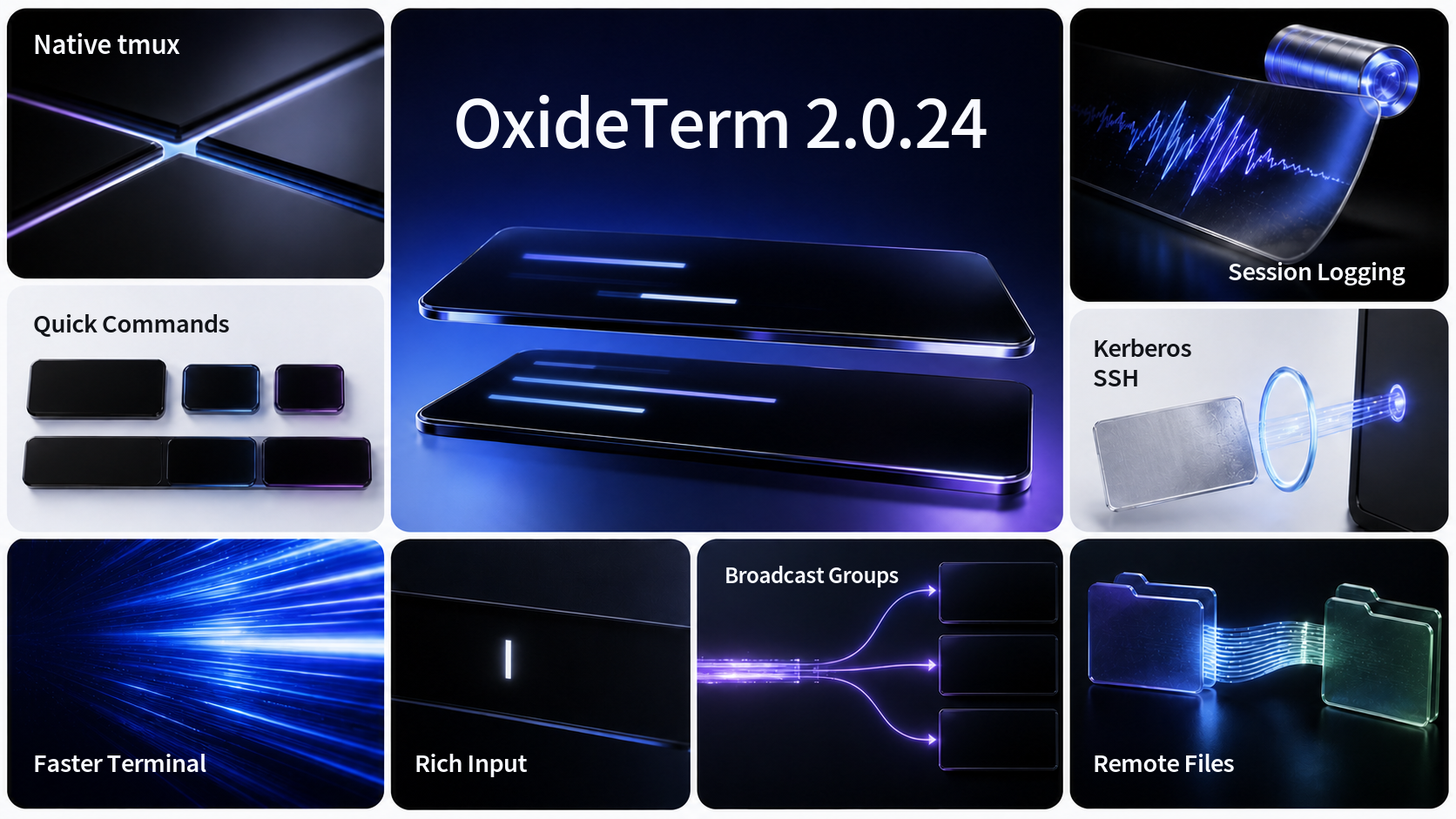
OxideTerm 2.0.24 adds native tmux control-mode sessions, parameterized Quick Commands, configurable session logging, named broadcast groups, cross-platform Kerberos authentication, richer remote-desktop workflows, and scoped terminal history while further improving terminal throughput and saved-connection routing correctness.
⚡ Further Terminal Performance
- Reduced repeated work across PTY draining, snapshot conversion, text layout, link preparation, and rendering; compacted snapshot-cell storage and reused unchanged terminal data more aggressively; and batched common ASCII parsing and grid writes in the vendored terminal stack.
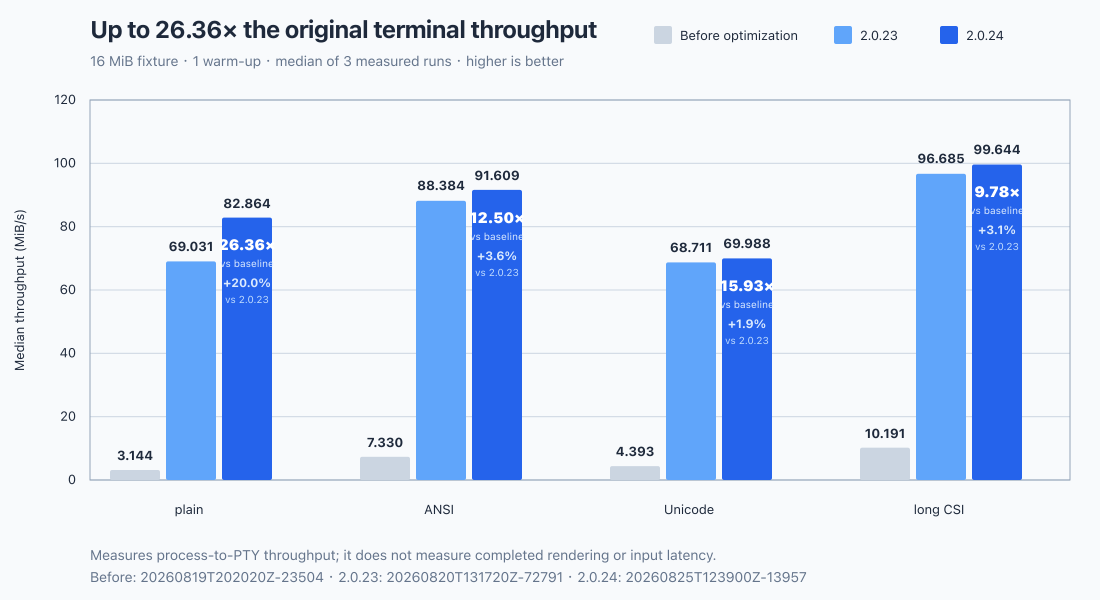
- In OxideTerm's reproducible 16 MiB release-build benchmark, median process-to-PTY throughput increased from 69.031 to 82.864 MiB/s for plain text, from 88.384 to 91.609 MiB/s for ANSI output, from 68.711 to 69.988 MiB/s for Unicode output, and from 96.685 to 99.644 MiB/s for long CSI sequences. These are further gains of 20.0%, 3.6%, 1.9%, and 3.1% over 2.0.23 respectively.
- Across both optimization rounds, 2.0.24 reaches 26.36×, 12.50×, 15.93×, and 9.78× the original baseline throughput for plain text, ANSI output, Unicode output, and long CSI sequences respectively.
- The comparison used the same fixture size, one warm-up, and the median of three measured runs. It measures process-to-PTY throughput rather than completed rendering or input latency.
- Corrected precise touchpad smooth scrolling so a new gesture preserves its fractional visual position and consumes the first pixel delta instead of briefly snapping in the opposite direction.
✨ Native tmux, Session Logs, Broadcast Groups, and History
- Added native tmux
-CCcontrol-mode sessions with session, window, and pane actions, synchronized pane layouts, draggable dividers, rename and command prompts, and explicit detach or close controls inside the terminal workspace. - Added configurable terminal session logging with global and per-connection policies, file-name and line templates, unique, append, or overwrite modes, optional ANSI control sequences, retention and size limits, and start, pause, resume, stop, and open-file actions. Automatic logging remains disabled by default because terminal output may contain sensitive data.
- Added named broadcast groups alongside temporary target selection. Group membership remains explicit, closed targets are not silently replaced, and the command sender continues to skip unavailable members instead of widening the target set.
- Restored compact Rich Input as a single-line text field with scoped ghost-text completion and an Up/Down history menu. Terminal history suggestions remain in process memory, are scoped to the relevant local session or SSH node, and are not stored in the operating-system credential store.
🧩 Parameterized Quick Commands
- Added text, choice, and secret parameters plus target-context tokens for host, username, port, current directory, connection, group, and selection. Templates support explicit POSIX shell quoting and are expanded independently for each selected target.
- Added protocol and host-pattern availability, per-target previews, unavailable-target reporting, bounded expansion, and per-command confirmation policies. Commands approved by the user are frozen before dispatch so later target or input changes cannot alter the authorized payload.
- Secret parameter values use short-lived protected buffers, stay out of stored Quick Command definitions and diagnostic output, and hide expanded previews that would expose them. Risk classification and confirmation are applied to the final expanded command.
- Expanded Quick Command management across the desktop UI, CLI, plugins, Public MCP, terminal triggers, Cloud Sync, and
.oxidetransfer. Categories and commands now support explicit ordering, and desktop exports use atomic snapshot replacement.
🤖 AI Provider Compatibility
- Aligned OpenAI-compatible model discovery, selector readiness, and chat execution. Local and private endpoints now reuse optional stored credentials and the same
/v1fallback during readiness checks, while compatible keyless gateways remain selectable.
🔐 SSH, Kerberos, and Connection Identity
- Added Kerberos-preferred SSH authentication on macOS, Linux, and Windows through the operating system's current credentials, with conventional fallback authentication, optional server identity, credential-availability feedback, and an explicit delegation warning and control.
- Added editable SSH negotiation order for key exchange, host-key, cipher, MAC, and compression categories, together with stage-aware connection progress, redacted connection traces, and progress cards that can be dismissed without cancelling the connection.
- Added operating-system connection handlers and an opt-in setting for external
ssh://,telnet://,mosh://,rdp://, andvnc://links, including safe delivery from a second application launch into the existing workspace. - Corrected Saved Connection reuse so route endpoints, complete proxy paths, runtime ownership, and workspace ownership must all match before an existing logical node or terminal can be focused. Profiles that share a host, username, and port remain logically isolated, while different ports are also distinct physical connection identities.
- Preserved local authentication material when synchronized connection metadata adds or changes Kerberos settings, so a metadata update cannot discard device-local passwords or passphrases.
🖥️ Remote Desktop and SFTP
- Expanded remote-desktop file transfer with remote browsing, root and parent navigation, downloads, progress and cancellation, destination selection, and overwrite, rename, or skip conflict policies.
- Expanded VNC security compatibility with VeNCrypt Plain and SASL authentication over TLS, including verified X.509 variants, credential-aware subtype selection, bounded protocol exchanges, and protected handling of usernames and passwords.
- Added RDP network-quality profiles for automatic detection, local networks, broadband, and low-bandwidth links so visual effects and bandwidth hints can match the connection.
- Improved SFTP upload buffering, hardened streamed archive transfers with bounded errors, idle timeouts, cancellation, cleanup, and unpacked-byte progress, and stopped slow terminal working-directory discovery from prematurely failing otherwise healthy SFTP workflows.
☁️ Backup and Sync Workflows
- Moved local encrypted
.oxideimport and export into the Cloud Hub so local backups and cloud synchronization live in one place while remaining available without configuring a cloud provider. - Extended synchronized Quick Command and SSH metadata while keeping device-local secret values outside portable snapshots and preserving them across compatible updates.
中文
OxideTerm 2.0.24 新增原生 tmux 控制模式、参数化快捷命令、可配置会话日志、命名广播组、跨平台 Kerberos 认证、更完整的远程桌面工作流及分作用域终端历史,同时继续提升终端吞吐量并修正已保存连接的路由复用。
⚡ 终端性能进一步强化
- 减少 PTY 排空、快照转换、文本布局、链接准备及绘制中的重复工作;压缩终端快照单元存储并更积极地复用未变化数据;同时在内置终端栈中批量处理常见 ASCII 解析与网格写入。
- 在 OxideTerm 可复现的 16 MiB 发布构建基准中,纯文本的进程到 PTY 吞吐量中位数由 69.031 MiB/s 提升至 82.864 MiB/s,ANSI 输出由 88.384 MiB/s 提升至 91.609 MiB/s,Unicode 输出由 68.711 MiB/s 提升至 69.988 MiB/s,长 CSI 序列由 96.685 MiB/s 提升至 99.644 MiB/s;相较 2.0.23 分别进一步提升 20.0%、3.6%、1.9% 和 3.1%。
- 综合两轮优化后,2.0.24 的纯文本、ANSI 输出、Unicode 输出及长 CSI 序列吞吐量分别达到最初基线的 26.36 倍、12.50 倍、15.93 倍和 9.78 倍。
- 对比采用相同的测试数据规模、一次预热及三次测量的中位数。该结果衡量进程到 PTY 的吞吐量,不代表绘制完成耗时或输入延迟。
- 修正精确触控板的平滑滚动:新手势会保留原有的小数行视觉位置并消费首段像素增量,不再先向相反方向短暂回跳。
✨ 原生 tmux、会话日志、广播组与历史记录
- 新增原生 tmux
-CC控制模式,支持会话、窗口与窗格操作、同步窗格布局、可拖拽分隔线、重命名与命令输入,以及在终端工作区内明确分离或关闭会话。 - 新增可配置终端会话日志,提供全局与单连接策略、文件名及行内容模板、创建唯一文件、追加或覆盖模式、可选 ANSI 控制序列、保留期限与大小上限,以及开始、暂停、继续、停止和打开日志操作。由于终端输出可能包含敏感数据,自动记录默认保持关闭。
- 新增命名广播组并保留临时目标选择。组成员始终需要明确指定,已关闭目标不会被其他终端静默替换,命令发送器会跳过不可用成员而不会擅自扩大目标范围。
- 将紧凑 Rich Input 恢复为单行文本框,并新增分作用域幽灵文本补全及上下键历史菜单。终端历史建议仅保存在当前进程内,按本地会话或 SSH 节点隔离,不写入操作系统凭据存储。
🧩 参数化快捷命令
- 新增文本、选项及敏感参数,并提供主机、用户名、端口、当前目录、连接、分组和选区等目标上下文令牌。模板支持显式 POSIX Shell 转义,并会为每个选中目标分别展开。
- 新增协议与主机模式可用范围、逐目标预览、不可用目标提示、有界展开及单命令确认策略。用户批准后的命令会在分发前冻结,后续目标或输入变化无法修改已经授权的内容。
- 敏感参数值使用短生命周期受保护缓冲区,不进入持久化快捷命令定义或诊断输出;可能暴露敏感值的展开预览会被隐藏。风险分级与确认针对最终展开后的命令执行。
- 扩展桌面界面、CLI、插件、Public MCP、终端触发器、Cloud Sync 及
.oxide传输中的快捷命令管理。分类和命令现可明确排序,桌面导出采用原子快照替换。
🤖 AI 服务兼容性
- 统一 OpenAI-compatible 模型发现、模型选择器就绪状态与聊天执行。对本地及私网服务的就绪探测现会复用可选的系统凭据和相同的
/v1回退规则,同时继续允许选择兼容的无密钥网关。
🔐 SSH、Kerberos 与连接身份
- 在 macOS、Linux 和 Windows 上新增优先使用当前操作系统凭据的 Kerberos SSH 认证,并提供常规认证回退、可选服务端身份、凭据可用性提示,以及明确的凭据委派警告与开关。
- 新增密钥交换、主机密钥、加密算法、MAC 及压缩类别的 SSH 协商顺序编辑,并提供分阶段连接进度、已脱敏连接追踪,以及可在不取消连接的情况下关闭的进度卡片。
- 新增操作系统连接协议处理及外部链接开关,支持
ssh://、telnet://、mosh://、rdp://和vnc://,并可将第二次应用启动收到的链接安全交付到现有工作区。 - 修复已保存连接的复用规则:只有路由端点、完整代理路径、运行时所有者及工作区所有者全部匹配时,才会聚焦已有逻辑节点或终端。即使多个配置共用相同主机、用户名和端口,逻辑终端仍彼此隔离;端口不同的连接也会使用不同的物理连接身份。
- 在同步连接元数据新增或修改 Kerberos 设置时保留本机认证材料,避免元数据更新丢弃设备本地的密码或口令。
🖥️ 远程桌面与 SFTP
- 扩展远程桌面文件传输,新增远端浏览、根目录与上级目录导航、下载、进度与取消、目标位置选择,以及覆盖、重命名或跳过冲突策略。
- 扩展 VNC 安全兼容性,支持 TLS 上的 VeNCrypt Plain 与 SASL 认证及经过验证的 X.509 变体,并根据凭据选择可用子类型,对协议交换设置边界,同时以受保护方式处理用户名和密码。
- 新增 RDP 网络质量配置,可选择自动检测、局域网、宽带或低带宽链路,使视觉效果与带宽提示更符合当前连接。
- 优化 SFTP 上传缓冲区;加强流式归档传输的有界错误、空闲超时、取消、清理及解包字节进度;同时避免较慢的终端工作目录探测过早中止本来正常的 SFTP 工作流。
☁️ 备份与同步工作流
- 将本地加密
.oxide导入与导出移入 Cloud Hub,使本地备份与云同步集中在同一位置,同时在未配置云服务商时仍可使用。 - 扩展同步的快捷命令与 SSH 元数据,并继续将设备本地敏感值排除在可移植快照之外,在兼容更新中保留这些值。
📥 Download for your system
| Operating system | x64 | ARM64 |
|---|---|---|
| Windows | Setup (.exe) | Setup (.exe) |
| macOS | DMG (Intel) | DMG (Apple Silicon) |
| Linux | AppImage · DEB · RPM | AppImage · DEB · RPM |
Portable archives, signatures, and Downloaded If SmartScreen warns, click More info -> Run anyway.
若 SmartScreen 弹出警告,点击 更多信息 -> 仍要运行。
sha256sums.txt remain available in the release assets below.
📌 Installation Tips / 安装提示
macOS
.dmg files may be quarantined by Gatekeeper. Run in Terminal:
xattr -cr ~/Downloads/OxideTerm_*.dmg
# or after install / 或安装后
xattr -cr /Applications/OxideTerm.app
Windows
Linux
# AppImage
chmod +x OxideTerm_*_linux_*.AppImage && ./OxideTerm_*_linux_*.AppImage

# Debian/Ubuntu
sudo dpkg -i OxideTerm_*_linux_*.deb && sudo apt-get install -f

# Fedora/RHEL-compatible systems
sudo dnf install ./OxideTerm_*_linux_*.rpm
🔗 Links
- Documentation: https://oxideterm.app
- GitHub Issues: https://github.com/AnalyseDeCircuit/oxideterm/issues
- Changelog: https://github.com/AnalyseDeCircuit/oxideterm/blob/main/.github/release-notes/stable-changelog.md