
Description
Grok-Desktop is an Electron-based desktop application for Windows 10/11 and Linux that wraps grok.com, allowing desktop-application-like access to Grok with support for xAI/X, Google, Apple and GitHub authentication.
Screenshot
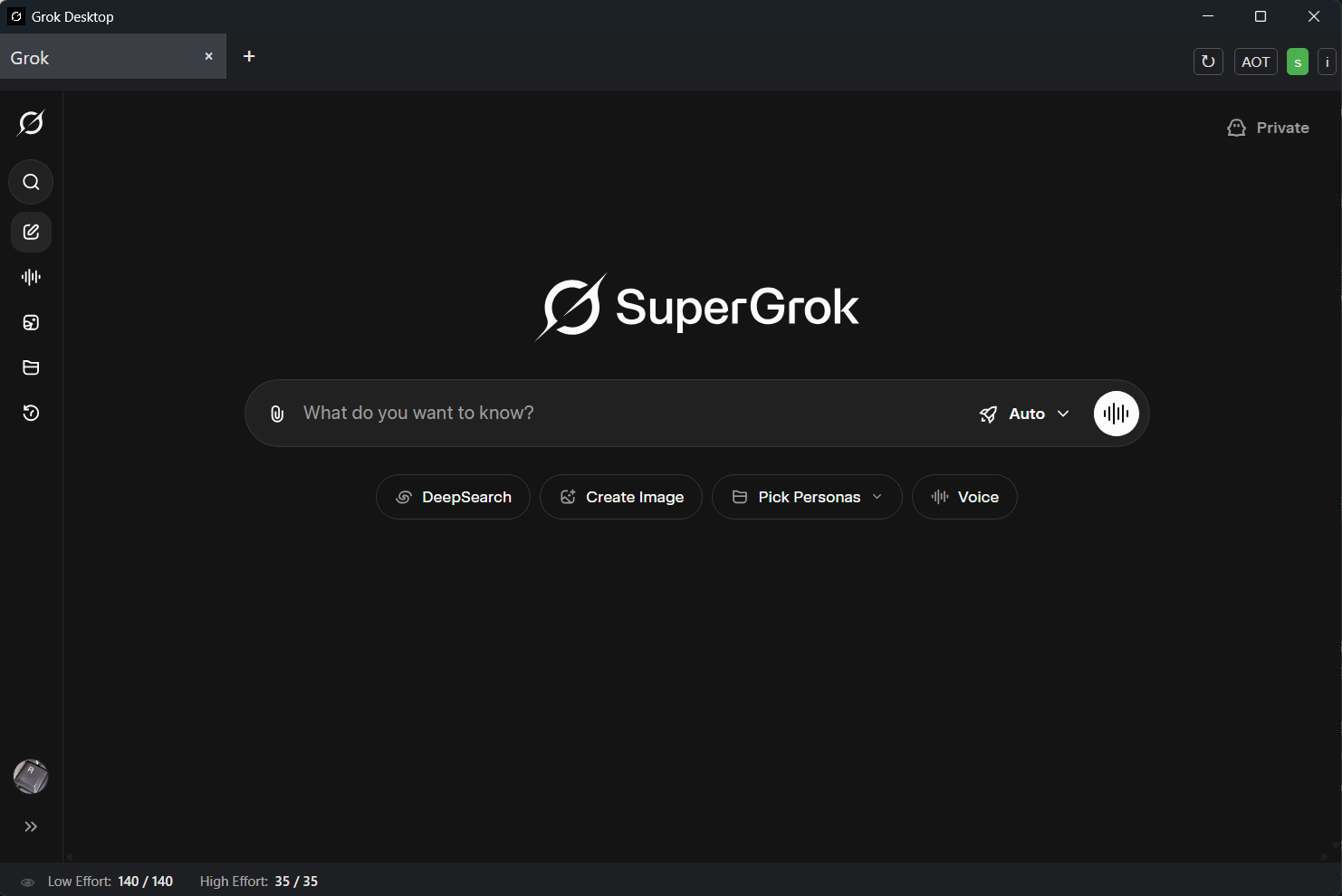
Features
- Desktop application wrapper for grok.com
- Multi-tab interface for multiple concurrent Grok conversations
- Real-time API Usage Monitoring - Track your Grok usage limits:
- Low Effort: Basic query limits and remaining tokens
- High Effort: Advanced feature usage tracking
- Grok 4 Heavy: Specialized model usage limits
- Refill Timer: Shows when limits reset
- Visual indicators: Green (normal), Orange (warning ≤25%), Red (critical ≤10%)
- Auto-refresh: Updates every 5 seconds when active
- Toggle controls: Show/hide stats via toolbar buttons (s and 👁)
- Authentication support for xAI/X, Google, Apple and GitHub accounts
- OAuth flows handled in-app for seamless login
- Clean interface with no menu bar for distraction-free usage
- Always-on-top function (AOT button) with cross-platform support
- Native support on Windows
- Linux support via wmctrl (automatic fallback included)
- Dark/Light theme support with system theme detection
- Auto-adapts to system preferences
- Forces light mode for Apple ID auth for reliability
- Grok speech mode fully supported
- Microphone and camera access with consent for grok.com
- Autoplay enabled for seamless voice interaction
- Update checks with in-app indicator and button
- Enhanced security features:
- Domain validation to prevent malicious subdomain attacks
- OAuth protection for secure authentication
- External URL validation (blocks localhost/private IPs)
- CSP (Content Security Policy) headers
- Electron sandboxing enabled
- Keyboard shortcuts:
Ctrl+T: Open new tabCtrl+Tab/Ctrl+Shift+Tab: Cycle through tabs (next/previous)Mouse-wheel-scroll: Scroll tabs when overflowing on tab barCtrl+Mouse-wheel-scroll: Cycle through tabs (next/previous)Ctrl+R: Reload active tabCtrl+I: Show About dialog
- Toolbar buttons:
- +: Create new tab
- ↻: Reload current tab with loading animation
- AOT: Toggle always-on-top mode
- s: Toggle API usage statistics display
- 👁: Toggle Grok-4-Heavy stats visibility
- i: Show About dialog
- Context menu with rich functionality:
- Back/Forward/Reload navigation
- Inspect Element for debugging
- Spell-check suggestions
- Add to Dictionary
- Smart link handling:
- External links open in default browser
- Grok/xAI/X/Google/Apple/GitHub auth flows handled in-app
- Single-instance application
- Subsequent launches focus the running window instead of creating duplicates
- Cross-platform support:
- Windows 10/11 (full support)
- Linux (Rocky Linux, RHEL, Ubuntu, Fedora, and more)
Prerequisites for use
- Windows 10/11 or Linux, x64
- Internet connection
- Grok account required. Sign up in app or use your xAI/X, Google, Apple or GitHub account to log in.
Changes in v1.3.0
- Electron 45.2.1 with current Chromium and Node security fixes.
- Locked electron-builder 26.18.0 and patched build dependencies; zero npm audit findings in the prepared tree.
- Correct Windows GPU detection (PR #33) and restore reliable AOT state, off at startup (PR #35).
- Restore Inspect Element (#13); open search-result links in background Grok tabs (#14).
- Keep OAuth popups in the persistent session and preserve their opener (#25/#26).
- Complete Google/Grok cookie handoffs in the original tab, allow sign-out cookie deletion and keep GitHub login/verification inside the app.
- Harden parsed URL validation, IPC sender checks, renderer sandboxing and media permissions.
- Fix Windows About URLs, rapid tab IDs, viewport clipping, usage error messages and stale documentation.
- Credit @realvathy, @VectorJay666 and @JoshuaWang2211 on the About page.
- Preserve all nine historical package/archive types, including the Windows 7z archive.
Downloads
Windows x64: EXE installer, MSI installer, portable EXE, ZIP, 7z.
Linux x64: DEB, RPM, tar.gz, 7z.
Feature PRs remain deferred. The maintainer confirmed Google, Apple, X and GitHub sign-in and Grok sign-out in the Windows VM. Imagine image-to-video aspect ratio remains unverified.
Validated with independent Node and Electron tests on Windows and Linux, production packaging for all nine formats, and the maintainer's Windows VM login/sign-out tests.