
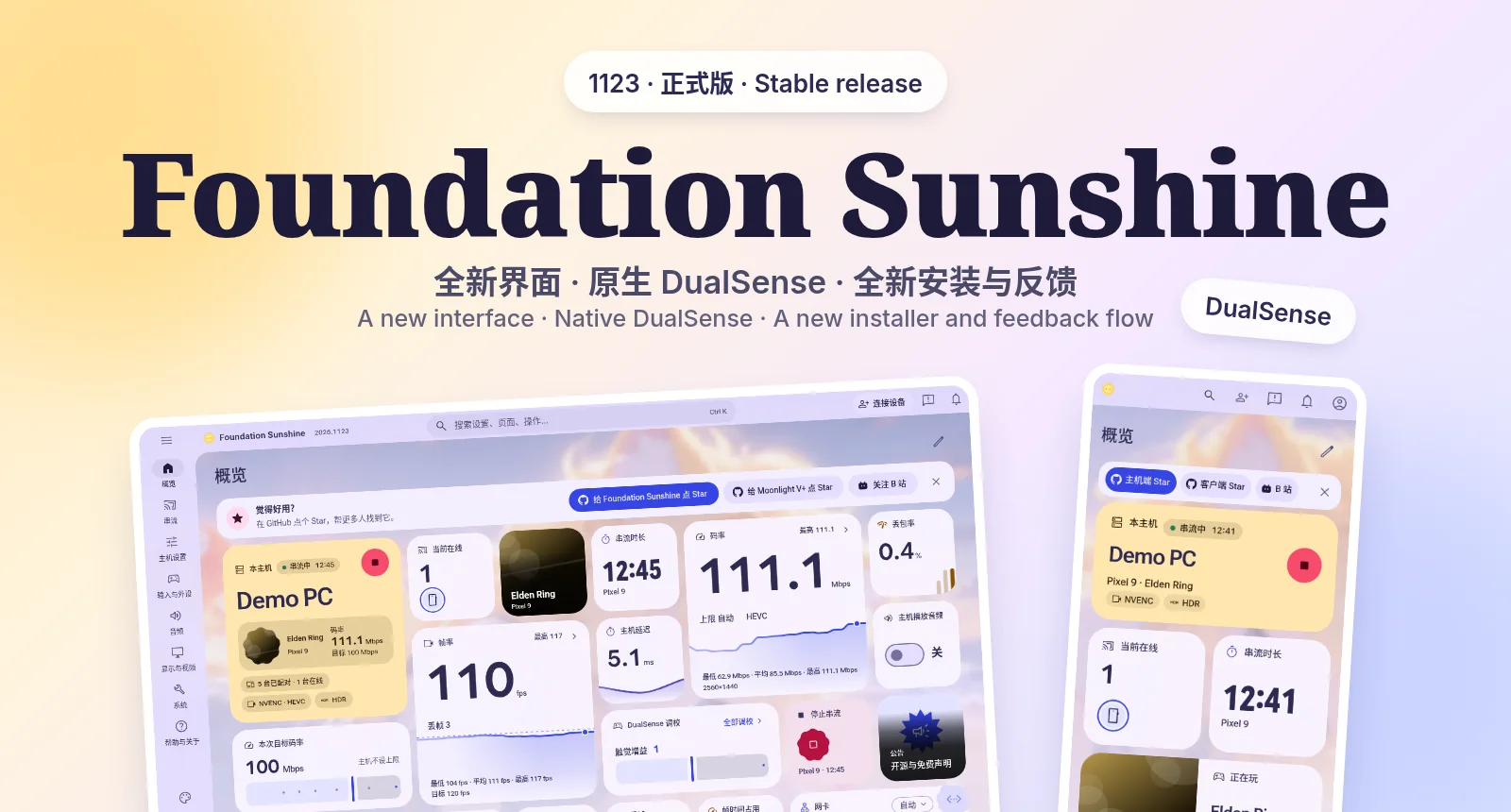





这是基地串流一系列重大更新的第一步:
全新的界面、内置原生 DualSense、全新的安装与反馈体验。
接下来还会有更多,敬请期待。
This is the first step of a series of major updates to AlkaidLab Streaming:
a brand-new interface, built-in native DualSense, and a new installation and feedback experience.
More is on the way, so stay tuned.
如果觉得好用,欢迎给项目点一个 Star!!!
If you like it, please give the project a Star!!!
Warning
N 卡用户请避开 616.55、616.64 版本驱动,可能导致虚拟显示器无法激活并出现串流 503 错误。
NVIDIA users: please avoid driver versions 616.55 and 616.64. They may stop the virtual display from activating and cause streaming 503 errors.
Note
基地串流完全免费。如果你通过第三方平台付费购买,请申请退款。
AlkaidLab Streaming (基地串流) is completely free. If you paid for it on a third-party platform, ask for a refund.
English release notes
New interface and home tiles
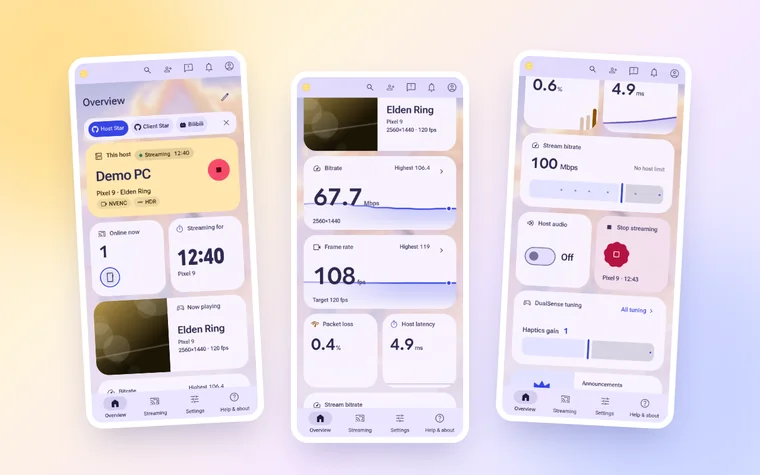
The web UI and the control panel have been redesigned, and the home tiles are fully in sync across both. Adds a clock mode, rotating tiles and live trend lines, and works comfortably on phones, tablets and desktops.
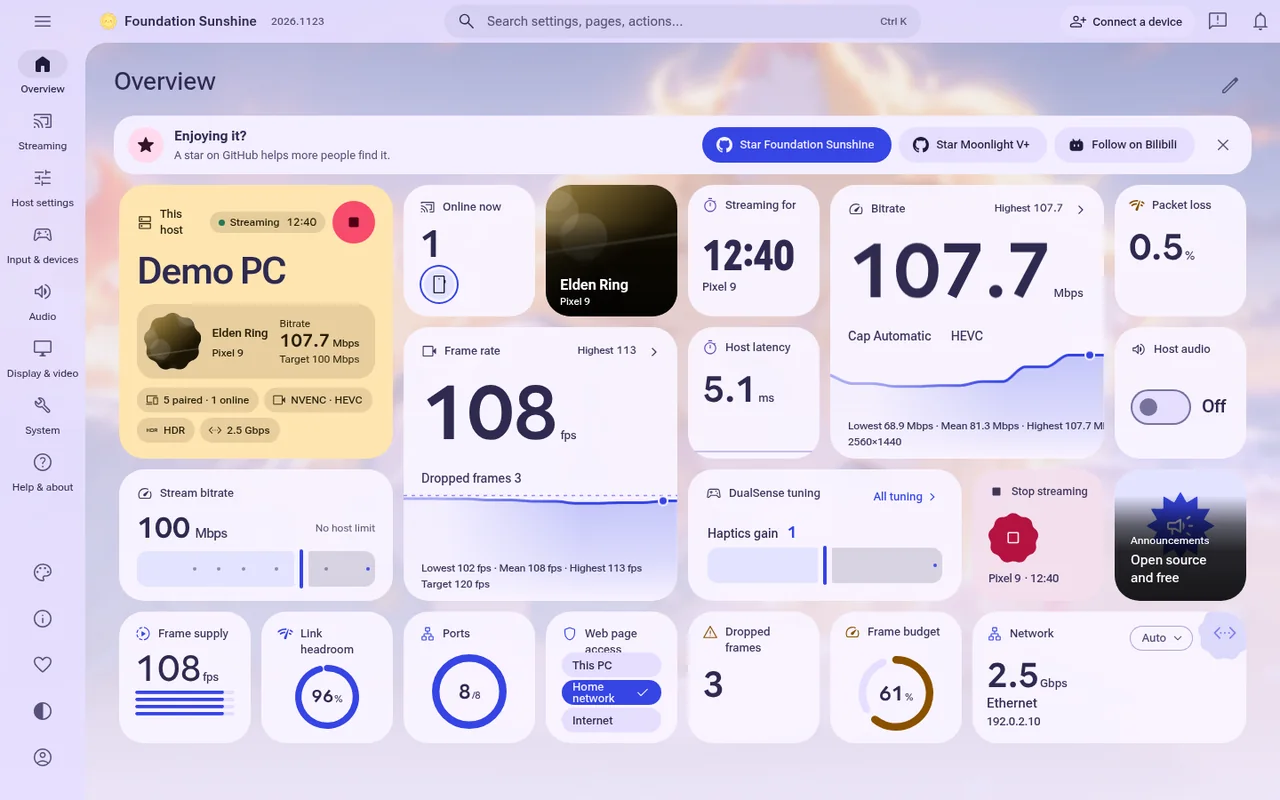
- Home tiles: Supports small, medium and large sizes, synced between the web UI and the control panel. Tiles can be added, reordered by dragging, and rotated.
- Clock mode: A large clock with your favorite tiles, made to stay on all the time on a second screen or tablet.
- Rotating tiles: Stacks several tiles into one group. Swipe up or down on a phone, or use the mouse wheel on a computer, to switch; tiles also rotate automatically.
- Live trends: Bitrate, frame rate, latency and packet-loss tiles carry a trend line.
- Tiles you can operate: Turns host audio on or off, adjusts the target bitrate, stops the stream and offers quick actions right on the tile.
- Wallpaper colors: The interface palette follows your wallpaper, in light and dark.
- Global search: Finds settings and pages in Chinese, English and pinyin.
- Clients and pairing: The pairing QR code refreshes on demand, and disabled devices are grouped separately.
- Help & About: Updates, host health check, feedback status and client downloads at a glance.
- App covers: Apps without a cover get one generated from their name, in six styles, portrait and landscape, set globally or per app. Apps that showed the placeholder before switch to a generated cover after the upgrade.
- Languages: The web UI and the control panel are fully available in 17 languages: Simplified Chinese, Traditional Chinese, English, Japanese, Korean, German, French, Spanish, Italian, Portuguese, Russian, Ukrainian, Polish, Czech, Bulgarian, Swedish and Turkish.
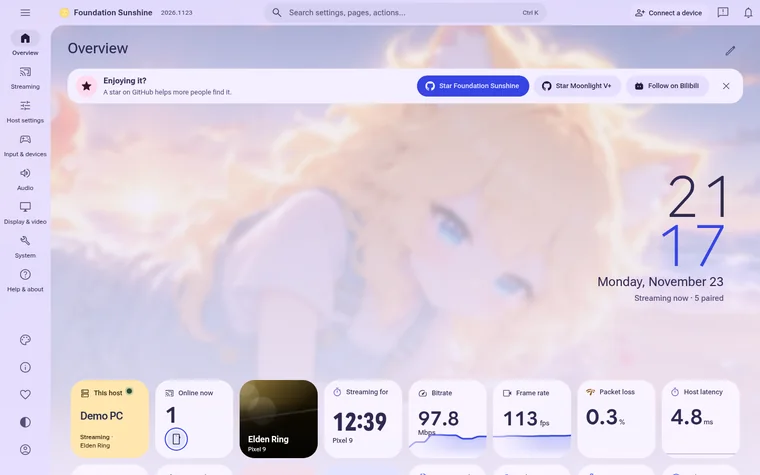 Clock mode |
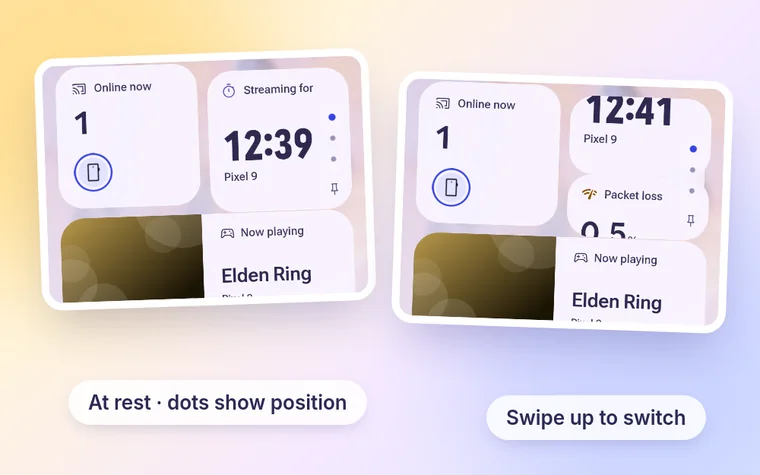 Rotating tiles |
 Two-column phone layout |
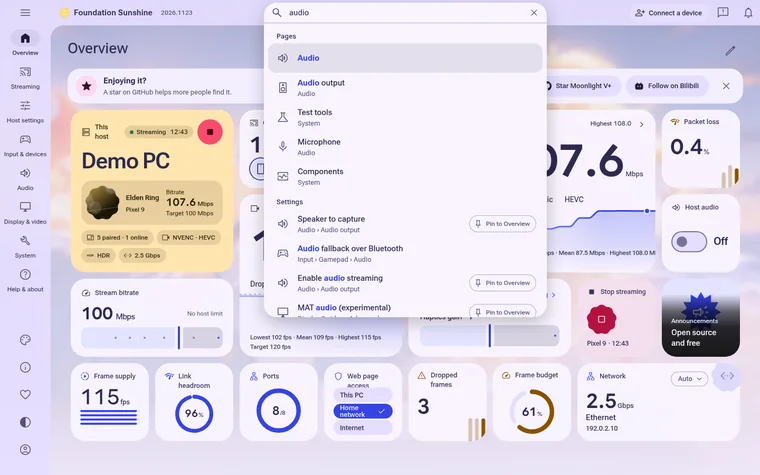 Global search |
More new interface features
- Adapts to phones, tablets and desktops. Square tiles sit in two columns on a phone, and adding and dragging tiles follows your finger without accidental taps.
- The network adapter tile automatically picks the adapter that carries the stream, and you can also switch it by hand.
- Backs up settings and restores the defaults in one click, with the last backup restorable.
- Every high-risk action asks for a second confirmation.
- Replies to in-app feedback appear in "Status and notifications".
There is more to discover on your own.
Built-in native DualSense
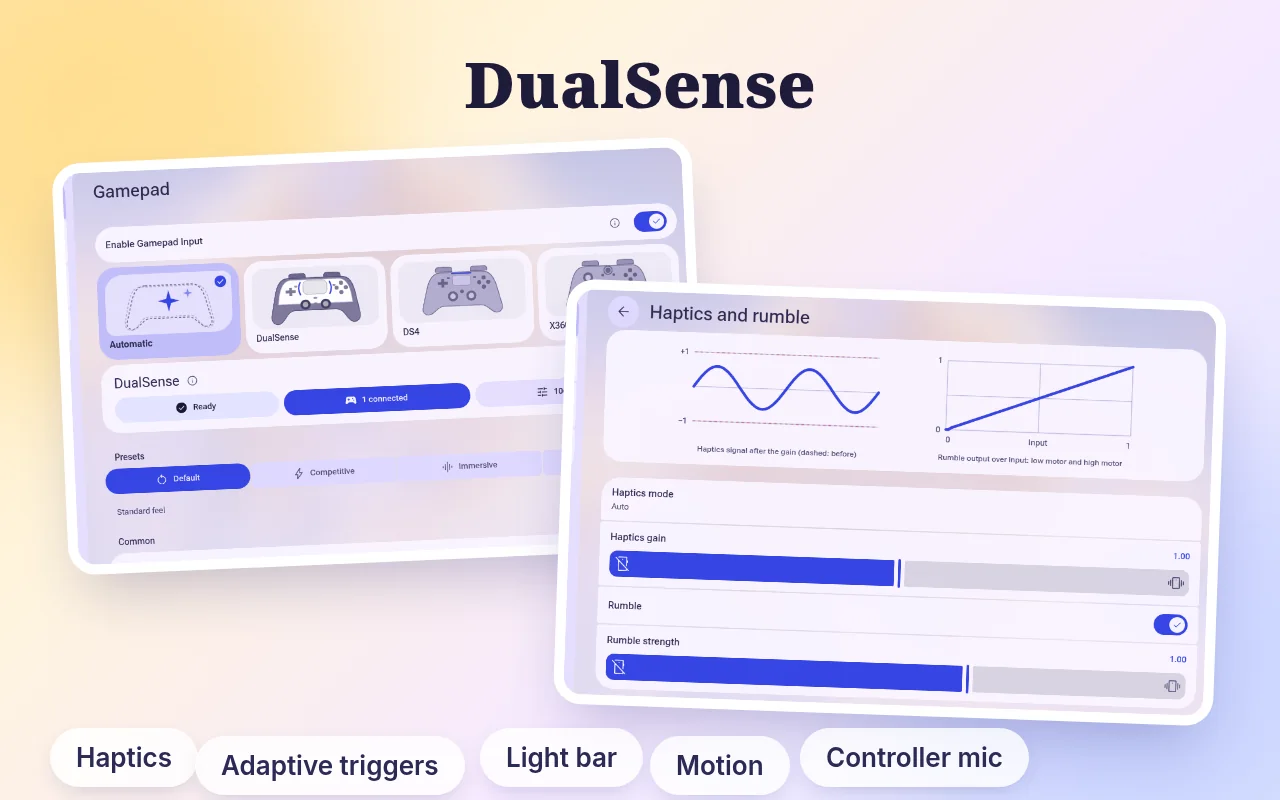
The host ships with native DualSense support. Adds haptic feedback, adaptive triggers, the light bar, motion sensing and the controller microphone, with no extra components: connect and play.
New installer and feedback
Adds a new setup wizard that recovers automatically when an upgrade fails, and a much smaller installer package. In-app feedback can attach logs and screenshots, and the developer's reply appears directly in your notifications.
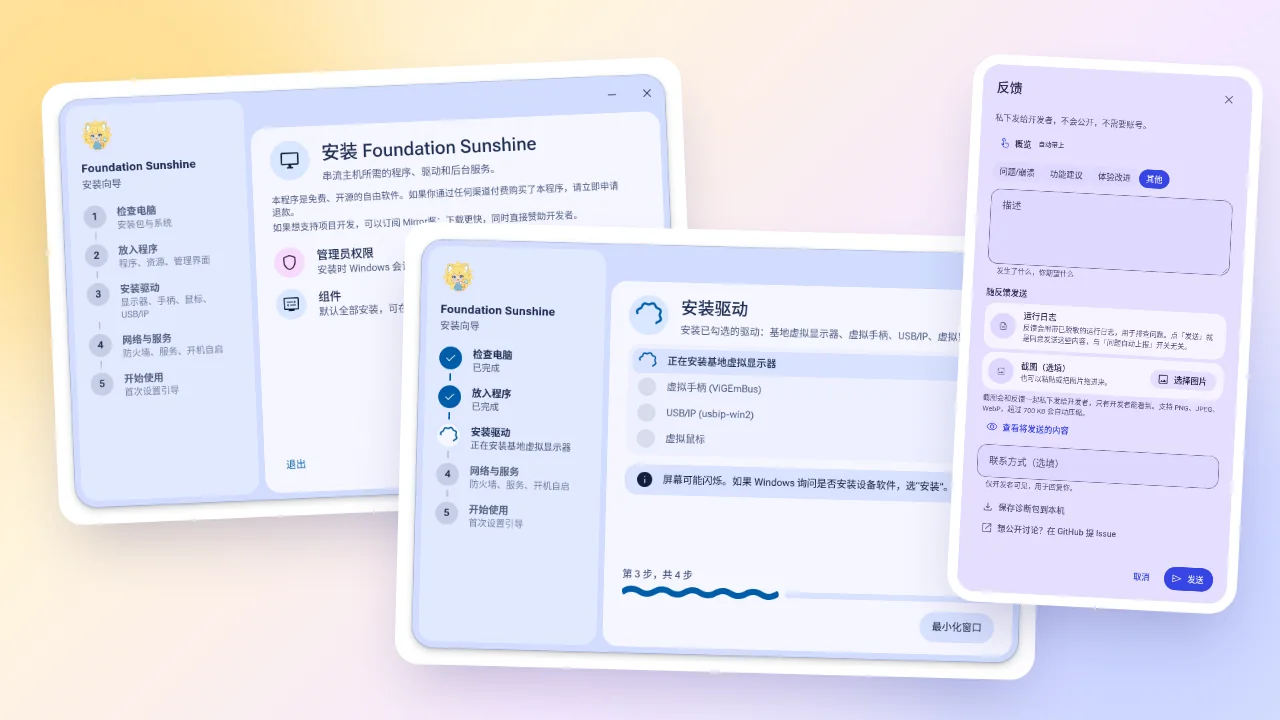
Setup wizard and in-app feedback (the installer screens are shown in Chinese)
Other improvements
- "Help & About" can check for and install updates directly, and offers a host health check.
- Supports searching settings in Chinese, English and pinyin, with one-click backup and restore of settings.
- Adds support for the Sparxie game component, which scans your game libraries and manages launching, including Sparxie releases with plugins such as the Endfield plugin.
- Adds larger virtual display size options, and enables zero-copy frame borrowing by default.
- Supports turning host audio playback on or off during a stream, and manages virtual audio devices in the control panel.
- Supports global DLSS noise reduction (off by default) that can be switched in real time.
- Keeps the stream running when a client changes network or roams through a relay.
- Adds sign-in and session protection for the local management interface.
- New one-click USB/IP repair: a missing or mismatched install, leftovers of an older or full edition, AMD motherboard USB issues and blocking security policies are all handled in one click.
- A pairing request opens a full-screen PIN entry (or the PIN page in the control panel, as you prefer), and every notification opens the matching page.
Fixes
- Fixes host crashes, unresponsive startup and stuck stream endings in several cases.
- Fixes a monitor being wrongly deactivated after it came back online, and the secondary display mode not working when no physical monitor is attached.
- Fixes abnormal colors and highlights when an HDR desktop is streamed to an SDR client.
- Fixes clients being unable to connect after several automatic options were turned on.
- Fixes no sound when there is no default playback device or when a virtual audio device is selected.
- Fixes the pairing QR code showing an unreachable address while a proxy tool is running.
- Fixes text typed in WeChat and other apps showing only the first character, repeated.
Upgrade notes
- Run the installer to install over the existing version. Your settings, apps and paired devices are kept.
- The virtual display needs Windows 10 22H2 or later, and the virtual mouse component needs Windows 11.
- We recommend also updating to the Moonlight clients recommended by Foundation.
Thanks
Thanks to our AlkaidLab members qiin2333 (founder), Yundi339, skyhua0224 and ShadowLemoon.
AlkaidLab members
 qiin2333 Founder |  Yundi339 |  skyhua0224 |  ShadowLemoon |
Thanks to our community contributors johnjheejin, miku3390, wwwhuibei and AsafMah, and to everyone who helped with testing and feedback.
Community contributors
 johnjheejin |  miku3390 |  wwwhuibei |  AsafMah |
Report issues: GitHub Issues
全新界面与首页磁贴
网页管理界面与控制面板全新设计,首页磁贴两端完全同步,提供时钟模式、轮换磁贴与实时走势,手机、平板与电脑都能顺手使用。
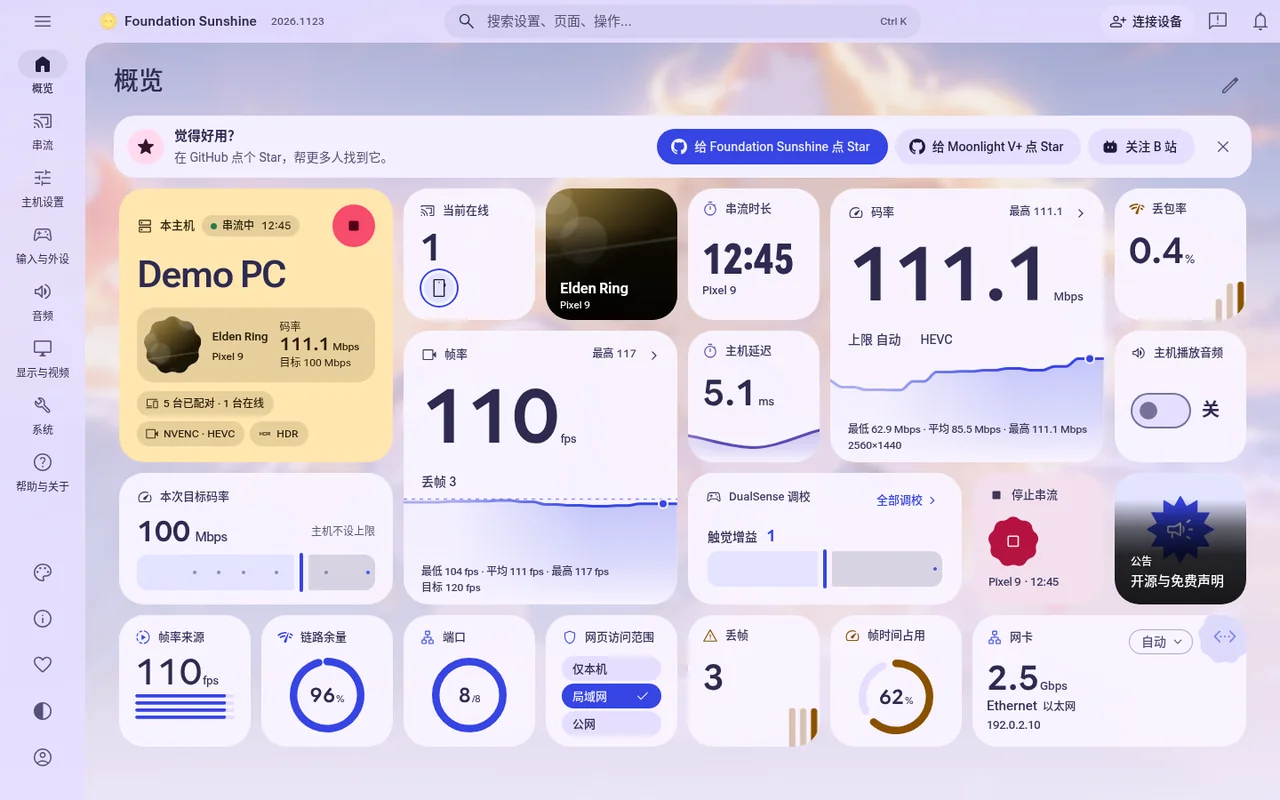
- 首页磁贴:小、中、大三种尺寸,网页与控制面板同步,可添加、拖动排序与轮换。
- 时钟模式:大号时钟配常用磁贴,适合放在副屏或平板上常亮。
- 轮换磁贴:多个磁贴叠成一组,手机上下滑、电脑滚轮切换,也会自动轮换。
- 实时走势:码率、帧率、延迟、丢包等磁贴带走势折线。
- 磁贴可直接操作:开关主机音频、调整目标码率、停止串流、快捷操作等。
- 壁纸取色:界面配色随壁纸变化,支持浅色与深色。
- 全局搜索:设置项与页面支持中英文和拼音搜索。
- 客户端与配对:配对二维码按需刷新,停用设备单独分组。
- 帮助与关于:更新、体检、反馈状态与客户端下载一目了然。
- 应用封面:没有封面的应用按名称自动生成封面,提供六种风格,支持竖版与横版,可全局或逐个应用设置;升级后原先显示占位图的应用自动换成生成封面。
- 多语言:网页管理界面与控制面板完整支持 17 种语言(简体中文、繁體中文、English、日本語、한국어、Deutsch、Français、Español、Italiano、Português、Русский、Українська、Polski、Čeština、Български、Svenska、Türkçe)。

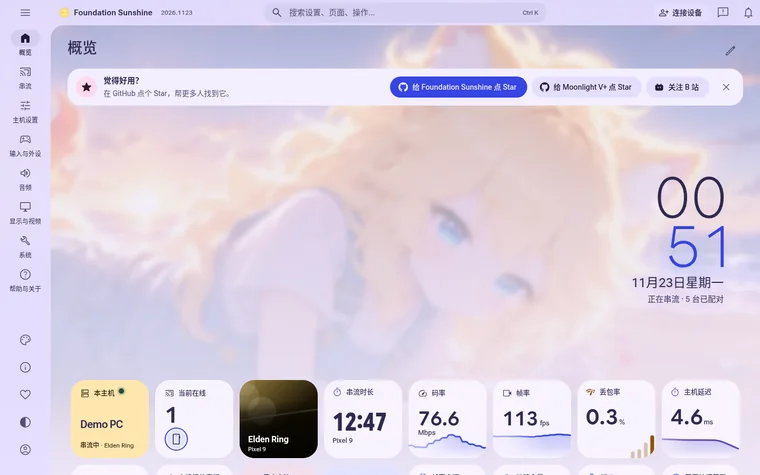 时钟模式 · Clock mode |
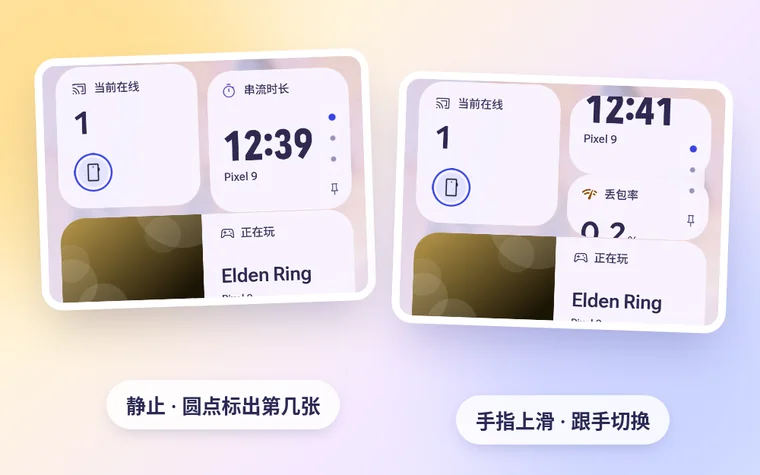 轮换磁贴 · Rotating tiles |
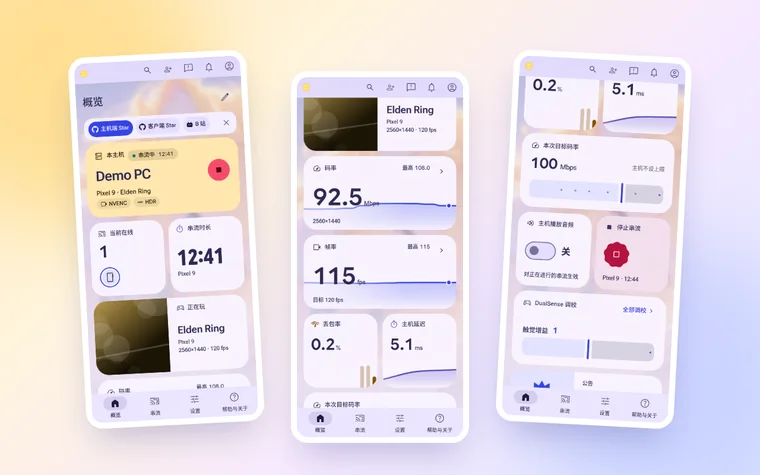 手机两列磁贴 · Two-column phone layout |
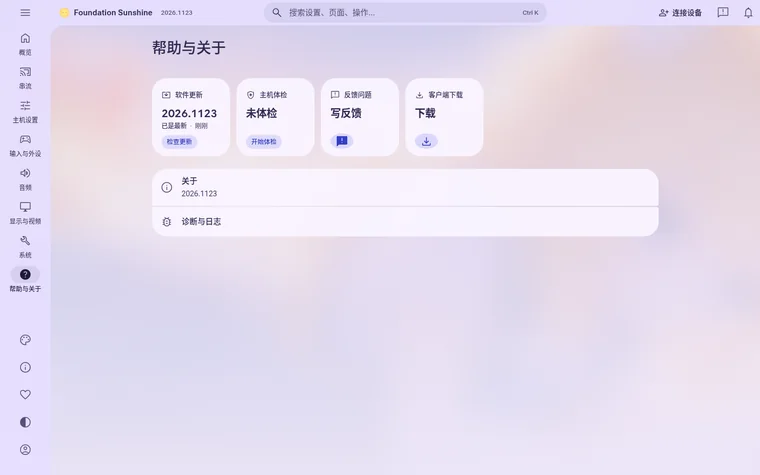 帮助与关于 · Help & About |
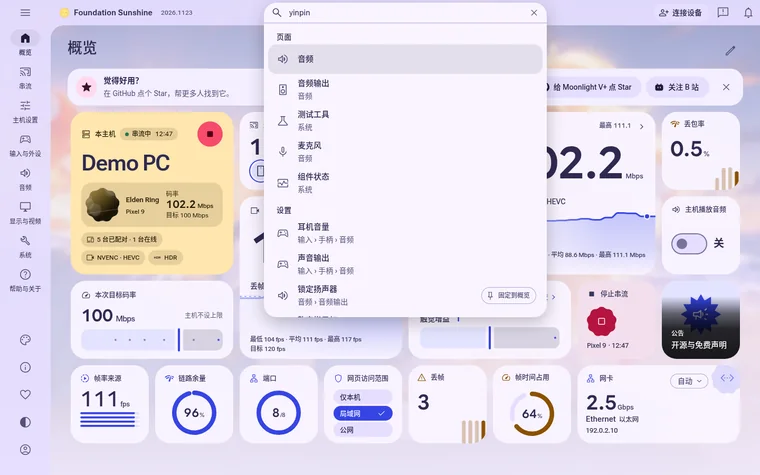 全局搜索 · Global search |
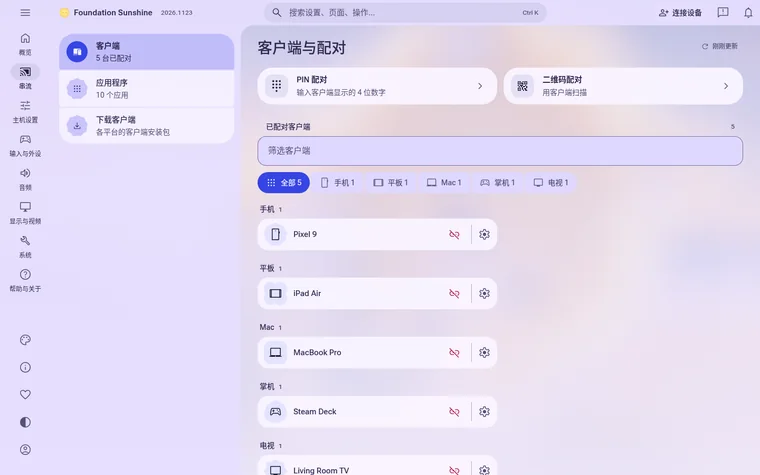 客户端与配对 · Clients and pairing |
更多新界面功能
- 手机、平板与电脑自适应排布,手机上方形磁贴两列并排,添加与拖动跟手不误触。
- 网卡磁贴自动选择承载串流的网卡,也可手动切换。
- 设置一键备份并恢复默认,可还原上次备份。
- 高风险操作均有二次确认。
- 应用内反馈的回复出现在「状态与通知」中。
更多细节欢迎自己探索。
内置原生 DualSense
主机内置原生 DualSense,全新支持触觉反馈、自适应扳机、灯条、体感与手柄麦克风,无需额外组件,即连即用。
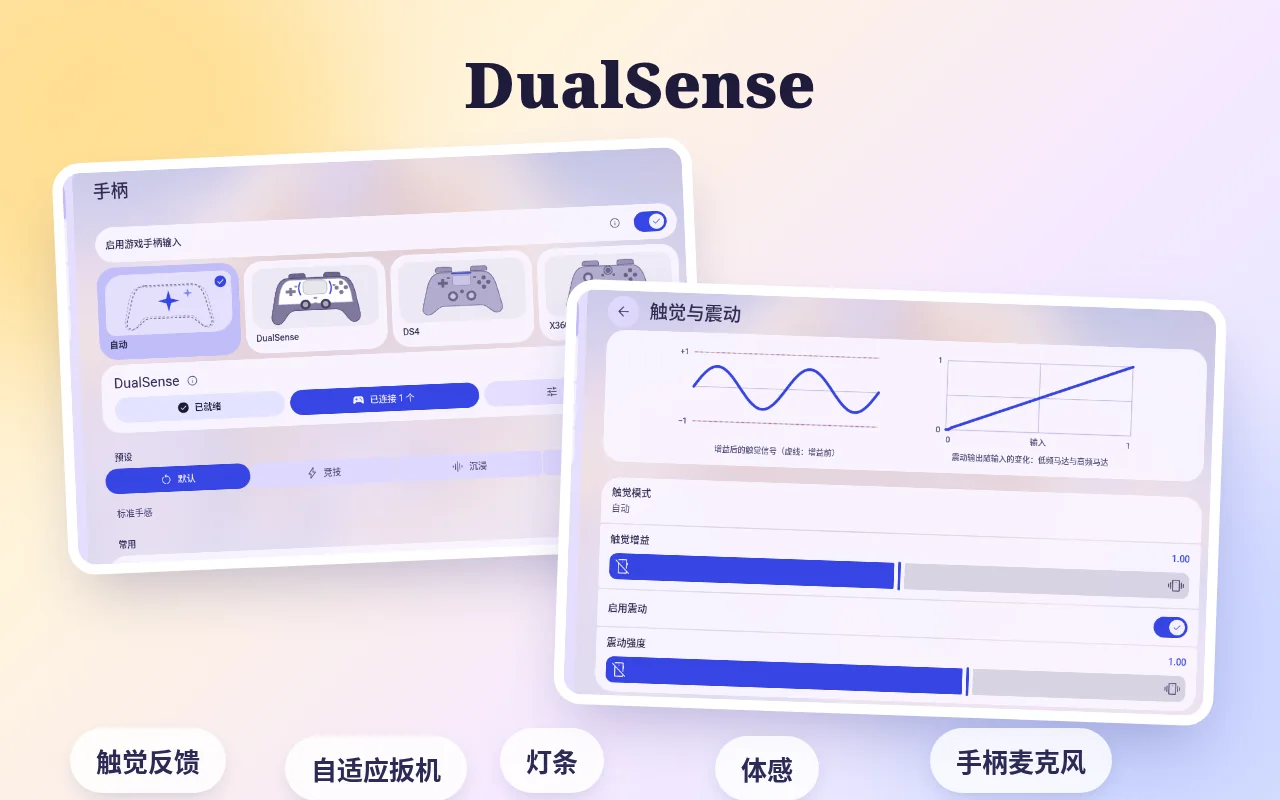
全新安装与反馈
全新安装向导,升级失败可自动恢复;安装包大幅精简。应用内反馈可附带日志与截图,开发者的回复会直接出现在通知里。
其他改进
- 「帮助与关于」可直接检查并安装更新,并提供主机体检。
- 支持中英文与拼音搜索设置,可一键备份与恢复设置。
- 全新支持 Sparxie 游戏组件,自动扫描游戏库并托管启动,支持插件版 Sparxie 及终末地插件。
- 虚拟显示器新增更大尺寸档位,默认启用零拷贝借帧。
- 支持串流中开关主机播放音频,虚拟声卡统一在控制面板中管理。
- 支持全局 DLSS 降噪(默认关闭),可实时开关。
- 客户端换网或中继漫游时串流不中断。
- 本机管理接口支持登录与会话保护。
- 全新支持 USB/IP 一键修复:未安装、版本不配套、旧版或完整版残留、AMD 主板 USB 异常、系统安全策略拦截等情况都可一键处理。
- 客户端请求配对时弹出全屏 PIN 输入(也可改为在控制面板中输入),所有通知均可点击直达对应页面。
修复
- 修复多种情况下主机崩溃、启动无响应或结束串流卡住的问题。
- 修复显示器重新上线后被误停用,以及无物理显示器时副屏模式不工作的问题。
- 修复 HDR 桌面串流到 SDR 客户端时颜色与高光异常。
- 修复开启多项自动选项后客户端无法连接的问题。
- 修复缺少默认播放设备或选择虚拟声卡时串流无声音的问题。
- 修复代理工具开启时配对二维码地址不可达的问题。
- 修复在微信等应用中输入文字时只出现首字重复的问题。
完整更新内容
本版重点
🏠 全新网页管理界面与控制面板
- 网页管理界面与控制面板基于 Material 3 Expressive 全面重设计,并随包集成全新 Foundation Panel(v1.0.19)。
- 全新首页磁贴:网页与控制面板磁贴的种类、顺序、尺寸与样式完全同步,提供小、中、大标准尺寸与底部实时走势折线。
- 支持时钟模式、轮换磁贴(手机上下滑动切换,电脑滚轮或触控板切换)与壁纸取色。
- 支持手机竖屏、横屏与平板自适应排布,手机上方形磁贴两列并排,添加与拖动磁贴跟手不误触。
- 支持中英文别名与拼音搜索设置项,提供一键备份并恢复默认设置与还原上次备份。
- 「帮助与关于」提供软件更新、主机体检、反馈状态与客户端下载磁贴,可直接在磁贴上检查并安装更新。
- 全新支持应用封面自动生成:没有封面的应用按名称生成竖版与横版封面,提供渐变、字母、图标、杂志、毛玻璃、几何六种风格,可全局设置或逐个应用单独设置,所有客户端统一显示;升级后原先显示占位图的应用自动换成默认样式的生成封面,已有海报的应用保持不变。
🎮 原生 DualSense 与输入
- 主机内置原生 DualSense 支持,移除旧版独立边车组件,即连即用更稳定。
- 全新支持原生触觉反馈、自适应扳机、灯条、玩家编号、体感,以及客户端麦克风路由至手柄麦克风。
- 支持按键与摇杆变化即时上报,可设置单手柄回报频率与体感上报频率上限。
- 提供灯条识别、扳机阻力与短震动的实机测试入口;未安装 USB/IP 传输时自动立即回退虚拟手柄。
- 支持按串流会话同步触摸键盘偏好,可在控制面板单独开关剪贴板同步。
🧰 全新安装器、反馈与故障排查
- 提供全新安装向导,首次安装可自选受保护的安装目录;升级失败或中止时自动恢复原有文件并重新启动主机服务。
- 支持安装期按需下载并校验 WebView2,安装包体积大幅精简,网页资源单份 Brotli 预压缩。
- 全新支持 USB/IP 最小载荷分发与根集线器异常自动回滚,保留用户自行安装的版本。
- 全新支持 USB/IP 一键修复:覆盖未安装、版本不配套、旧版或完整版残留、AMD 主板 USB 异常、系统安全策略拦截与需要重启等全部可探测状态,修复后即可继续串流。
- 提供主机体检(Doctor)、显卡驱动故障隔离与安全模式,以及可选的崩溃报告。
- 应用内反馈可附带匿名处理日志与截图,开发者的回复会出现在「状态与通知」中(仅对新版提交的反馈生效)。
其他改进
🖥️ 显示、视频与画质
- 全新支持 AMD AMF 实验性 VPE 转换与缩放管线(默认关闭),编码器失败时自动回退。
- 虚拟显示器新增
huge(约 32 英寸)尺寸档位,large调整为约 18.4 英寸,默认启用零拷贝借帧。 - 支持画面静止时按配置重发尾帧并优化发帧节奏,降低高负载下的积压与丢帧。
- 支持全局 DLSS NR(默认关闭),可在控制面板与网页端实时开关。
- 支持配置降采样质量、输入动态加速及默认桌面应用的横版、竖版海报。
🔊 音频与游戏组件
- 支持串流中开关主机播放音频,默认输出设备随之切换。
- 支持客户端麦克风经虚拟 USB 音频设备透传至主机,并提供音频自检。
- 虚拟声卡(VB-CABLE)的检测、安装、修复与卸载统一在 Foundation Panel 组件管理中维护。
- 支持实验性 MAT 实时音频采集组件(
mat_live,默认关闭)。 - 全新支持 Sparxie 游戏组件,可扫描 Steam、Epic 与主流启动器游戏库并托管启动;支持插件版 Sparxie,终末地设置通过插件保存与传递,配置校验不通过时不会写入;在组件管理中打开 Sparxie 仅在需要时请求管理员授权。
🌐 网络、配对与会话安全
- 支持本机管理接口的会话登录与 CSRF 保护,并对登录提供速率限制。
- 全新支持经认证的 UDP 端点刷新,客户端端口迁移或中继漫游期间串流不断开。
- 支持向兼容客户端上报主机锁屏状态。
- 客户端请求配对时弹出全屏 PIN 输入,支持键盘、触屏与手柄,可在设置中改为在控制面板中输入;所有通知均可点击直达对应页面,从通知中心点击同样有效。
- 支持公网可达性分步检测与独立外部连通性验证,可识别路由器透明代理。
- 支持 RDP 远程桌面场景下的控制台采集与管理面板访问。
修复
- 修复并发握手场景下证书校验共享上下文导致的随机崩溃。
- 修复服务先收到停止请求再启动时的未捕获异常,以及显示设备恢复卡死导致主机启动无响应的问题。
- 修复枚举残缺显示器时主机崩溃退出,以及无物理显示器时副屏模式虚拟显示器无法工作的问题。
- 修复显示设置为「不更改」时,物理显示器重新上线后被误套用旧拓扑并停用的问题。
- 修复虚拟显示器客户端校准与锁屏重连后状态错串或未能恢复的问题。
- 修复 HDR 桌面串流至 SDR 客户端时的色彩与高光映射异常,以及 HEVC 主显示元数据亮度单位换算错误。
- 修复 AMD 独立编码路径码率可能超出客户端上限的问题。
- 修复开启多项自动选项后加密 RTSP 握手消息超长导致客户端无法连接的问题。
- 修复客户端报告 0 帧率时的除零崩溃、着色器缺失时的空指针崩溃,以及媒体广播阻塞导致结束串流挂起的问题。
- 修复系统缺少默认播放设备时反复刷写错误日志、接入新设备后无法自动出声的问题。
- 修复选择 VB-CABLE 等虚拟声卡时设备名称乱码且串流无声音的问题。
- 修复代理工具接管默认路由(
198.18.0.0/15)时配对二维码给出不可达地址的问题。 - 修复静默安装或卸载时确认弹窗阻塞,以及卸载时未清理右键菜单的问题。
- 修复在微信等应用中通过文字输入发送内容时只出现首字重复的问题。
- 修复空配置项读取异常与强制软件编码开关未生效的问题。
技术细节
- 首页磁贴由 foundation-ui 共享组件统一绘制,网页与控制面板同一套布局模型;手机宽度按 iOS 小组件规则排布(1×1 两列、中号整行、大号两行),字号按列宽有上限地缩放,标题只在词间换行。
- 时钟模式只放有方块设计的磁贴;快捷操作提供 2×2 方块样式,窄屏逐级收为紧凑或纯图标,按钮不被裁切。
- 轮换磁贴:触屏竖向滑动带吸附与回弹且不抢页面滚动,电脑滚轮/触控板一次切一张,操作时暂停自动轮换;拖动磁贴逐帧重算位置并带换位迟滞。
- 「帮助与关于」磁贴:软件更新(版本、状态、磁贴上直接检查或更新)、主机体检、反馈状态(新回复数或已提交数与最近状态)、客户端下载;「关于」行显示更新状态,导航栏关于图标在有新版本时显示提示点。
- 反馈回复通道:每条新版反馈带不可猜测的回复钥匙,开发者在反馈 issue 以「回复用户:」开头评论或以修复版本关闭后,回复经只读接口下发,客户端不写入任何新数据。
- 安装器在目录切换、停服失败、MAT 组件停止失败、复制回滚等所有中止路径恢复
assets\web与暂存程序文件后重启SunshineService;网页资源未知扩展名立即返回 404(no-store)。 - 原生 DualSense:USB/IP 不可用、组件缺失等结构性失败只尝试一次并立即回退,其余失败最多重试一次,不再等待。
- 主机播放音频运行时开关同步切换默认音频输出设备。
- 设置注册表补齐 #1430 的 18 个配置文件专有设置;剪贴板同步作为「输入与外设」独立页面。
升级说明
- 直接运行安装程序覆盖安装即可,设置、应用与已配对设备都会保留。
- 虚拟显示器需要 Windows 10 22H2 或更高版本;虚拟鼠标组件需要 Windows 11。
- 建议同时更新到基地官方推荐的 Moonlight 客户端。
感谢
感谢基地成员 qiin2333(创始人)、Yundi339、skyhua0224、ShadowLemoon。
qiin2333 创始人 | Yundi339 | skyhua0224 | ShadowLemoon |
感谢社区贡献者 johnjheejin、miku3390、wwwhuibei、AsafMah,以及所有参与测试和问题反馈的朋友们。
johnjheejin | miku3390 | wwwhuibei | AsafMah |
问题反馈:GitHub Issues