
Novidades da 0.60.5
- Seletor de qualidade das texturas: Desligada / Alta / Máxima (#235). Veja a tabela abaixo.
- Vazamento de memória corrigido (~60 MB por minuto, mais de 7 GB em meia hora: engasgos em
sessões longas). PR #219, Oussama268. - Mais FPS: +3% na média e +12% na mínima (descritores reaproveitados entre desenhos
iguais). PR #232, Tadomikaari312-Hy. - Carregamento depois de atualizar o driver da placa: 106 s → 7 s. PR #215, Oussama268.
- AMD GCN (RX 470–590, Vega, APUs): provável correção dos personagens e da fumaça brancos.
PR #205, Lucas-blip-png. Conte nas issues se resolveu na sua placa. - CPUs com 4 threads não ficam mais presas no carregamento. PR #198, Lucas-blip-png.
- Engasgos curtos não piscam mais uma tela preta de carregamento; vigia de travamento (as pilhas
das threads vão para o log depois de 15 s sem quadro); correções de uma revisão de código;
lançador mais robusto (PRs #207 e #212).
Menu dentro do jogo (F1)
Aperte F1 (ou Insert, ou L3+R3 no controle) durante o jogo. O mouse fica livre com o
menu aberto; Esc ou F1 fecha.
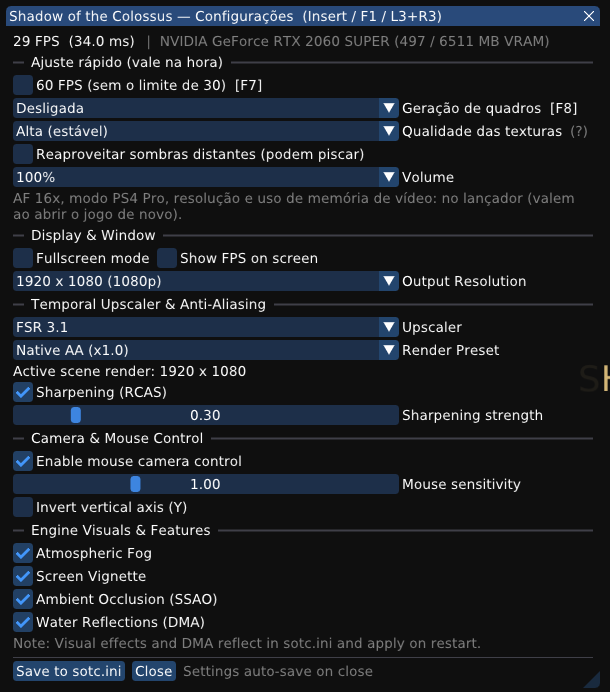
- Ajuste rápido (vale na hora): 60 FPS, geração de quadros, qualidade das texturas,
reaproveitar sombras distantes, volume. Também ficam salvos como escolha do lançador. - Tela e janela: tela cheia, contador de FPS, resolução de saída.
- Upscaler e nitidez: upscaler, preset, força da nitidez (RCAS).
- Câmera e mouse: câmera pelo mouse, sensibilidade, inverter eixo Y.
- Efeitos do motor: névoa, vinheta, oclusão ambiente (SSAO), reflexos da água (valem ao
abrir o jogo de novo). - No topo: FPS, tempo de quadro, a placa e a memória de vídeo em uso.
Atalhos
| Tecla | O que faz |
|---|---|
| F1 / Insert / L3+R3 | Abre ou fecha o menu do jogo |
| F7 | Liga/desliga o limite de 30 FPS (60 FPS sem o limite) |
| F8 | Geração de quadros: desligada → DLSS-G → FSR 3 (se a placa suportar) |
| F10 | Painel de desempenho (FPS e tempo de quadro) |
| F11 | Janela / tela cheia |
Qualidade das texturas
No lançador (Ajustes rápidos → Texturas) e no menu do jogo (muda na hora):
| Nível | O que faz | Problemas possíveis |
|---|---|---|
| Desligada | Só as versões 256×256 das texturas (como antes da 0.58.1). | Chão, pedras e folhas borrados. Para placas com pouca memória de vídeo. |
| Alta (estável), o padrão | O jogo carrega as texturas em alta resolução. Quando a memória de texturas do jogo está acabando, elas pedem um nível mais grosso e o jogo libera espaço antes de faltar. | Um pouco menos nítida em áreas grandes e abertas: ali essa memória fica quase sempre cheia e o nível mais grosso continua (#235). |
| Máxima (nítida) | Texturas sempre no nível mais fino, sem essa proteção. | Pode fechar o jogo em vistas muito amplas (espada erguida contra o sol, Santuário, área do último colosso; falha 0x1a371, #186), principalmente no modo PS4 Pro. Não aconteceu nos nossos testes de 5 a 10 minutos, mas já foi relatado. Se acontecer, volte para Alta. Usa mais memória de vídeo.
|
Quem tinha "Texturas em alta qualidade" marcada passa para Alta; desmarcada, para Desligada.
What's new in 0.60.5
- Texture quality selector: Off / High / Maximum (#235), see the table below.
- Memory leak fixed (~60 MB per minute, over 7 GB in half an hour: stutter in long sessions).
PR #219, Oussama268. - More FPS: +3% average, +12% minimum (descriptor binds reused between identical draws).
PR #232, Tadomikaari312-Hy. - Loading after a GPU driver update: 106 s → 7 s. PR #215, Oussama268.
- AMD GCN (RX 470–590, Vega, APUs): likely fix for the white characters and smoke. PR #205,
Lucas-blip-png. Please report in the issues whether it helps on your card. - 4-thread CPUs no longer stuck loading. PR #198, Lucas-blip-png.
- Short hitches no longer flash a black loading screen; a hang watchdog (thread stacks in the log
after 15 s without a frame); code review fixes; sturdier launcher (PRs #207 and #212).
In-game menu (F1)
Press F1 (or Insert, or L3+R3 on the controller) while playing. The mouse is free while
the menu is open; Esc or F1 closes it.
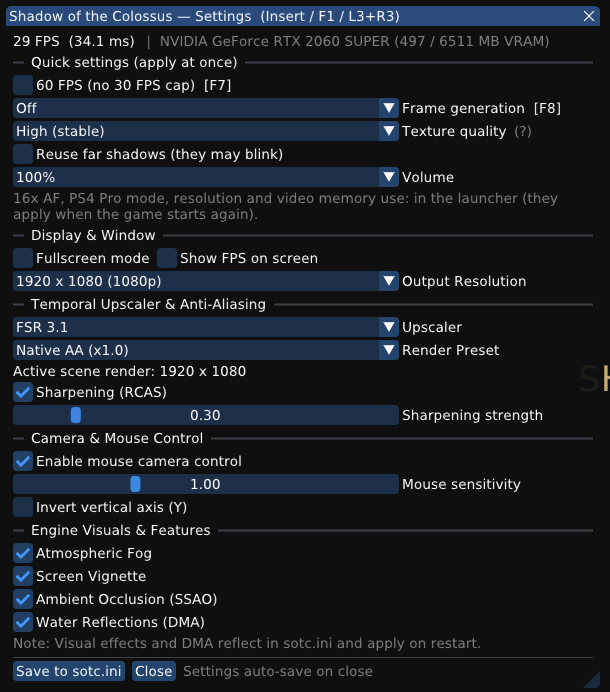
- Quick settings (apply at once): 60 FPS, frame generation, texture quality, far shadow
reuse, volume. Also saved as the launcher's choice. - Display & Window: fullscreen, FPS counter, output resolution.
- Upscaler & sharpening: upscaler, render preset, RCAS sharpening strength.
- Camera & Mouse: mouse camera, sensitivity, invert Y.
- Engine visuals: fog, vignette, ambient occlusion (SSAO), water reflections (apply on the
next start). - The header shows FPS, frame time, the GPU and its video memory in use.
Shortcuts
| Key | What it does |
|---|---|
| F1 / Insert / L3+R3 | Opens or closes the in-game menu |
| F7 | 30 FPS cap on/off (60 FPS without the cap) |
| F8 | Frame generation: off → DLSS-G → FSR 3 (when the GPU supports it) |
| F10 | Performance overlay (FPS and frame time) |
| F11 | Window / fullscreen |
Texture quality
In the launcher (Quick settings → Textures) and in the in-game menu (changes at once):
| Level | What it does | Possible problems |
|---|---|---|
| Off | The game's 256×256 textures only (as before 0.58.1). | Blurry ground, rocks and leaves. For GPUs short of video memory. |
| High (stable), default | The game streams its high resolution textures. When its texture memory runs low, they ask for a coarser level so the game frees space before it runs out. | A little less sharp in large open areas: that memory is almost always full there, so the coarser level stays (#235). |
| Maximum (sharp) | Always the finest level, without that protection. | May close the game in very wide views (sword raised against the sun, the Shrine, the last colossus' area; fault 0x1a371, #186), mostly in PS4 Pro mode. Not seen in our 5–10 minute runs, but reported before. If it happens, go back to High. Uses more video memory.
|
"High quality textures" on becomes High; off becomes Off.
Sony firmware (libSceNgs2/libSceUlt) is not included: use the files from your own console.