
🎉 New Companion App: OmniConsole
Xbox App is no longer the only FSE Home. OmniConsole runs as a native FSE Home shell, launching straight into Steam Big Picture or any gaming platform on boot.
- 🚀 Auto-launches your configured platform on boot
- 🎮 Gamepad support for navigating settings
- ⭐ Built-in platforms: Steam Big Picture, Xbox, Epic Games, Armoury Crate SE, Playnite Fullscreen
- ⚙️ Custom platforms: executable, protocol URI, or packaged MSIX/APPX app
- 🔧 Open settings from Game Bar without leaving FSE
- 📤 Export and share platform configurations
- 🖥️ Compatible with all FSE-enabled devices — native FSE handhelds and systems using this tool
- 🌐 Available in English, Traditional Chinese, and Simplified Chinese
- ✅ No Defender exclusions, no Xbox flashing
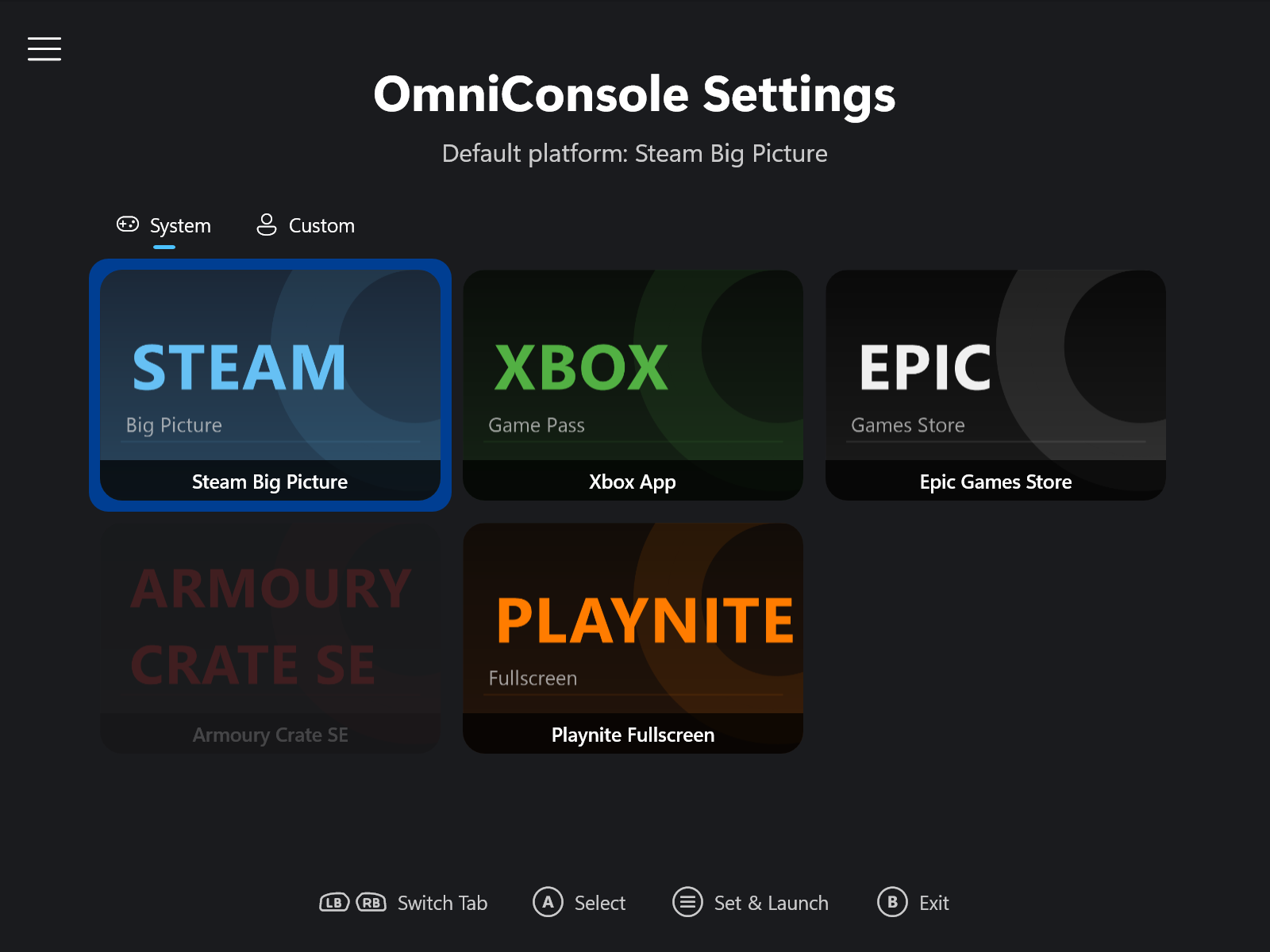 | 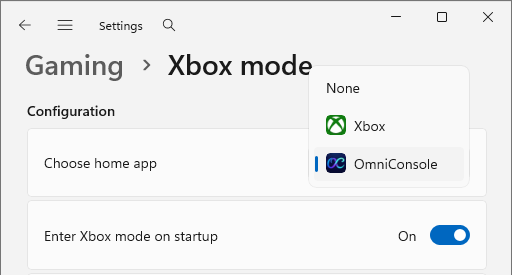 |
| OmniConsole Settings | Settings → Gaming → Full screen experience |
🎉 全新配套工具:OmniConsole
Xbox App 不再是唯一的 FSE 首頁。OmniConsole 以原生 FSE 首頁殼層的方式運作,開機直接進入 Steam Big Picture 或任何遊戲平台。
- 🚀 開機自動啟動設定的遊戲平台
- 🎮 手把支援,導航設定介面
- ⭐ 內建平台:Steam Big Picture、Xbox、Epic Games、Armoury Crate SE、Playnite Fullscreen
- ⚙️ 自訂平台:執行檔、通訊協定 URI 或封裝 MSIX/APPX 應用程式
- 🔧 直接從 Game Bar 開啟設定,無需離開 FSE
- 📤 匯出並分享平台設定
- 🖥️ 相容所有已啟用 FSE 的裝置,包括原生 FSE 掌機與透過本工具開啟 FSE 的系統
- 🌐 提供英文、繁體中文與簡體中文介面
- ✅ 無 Defender 排除,無 Xbox 閃現
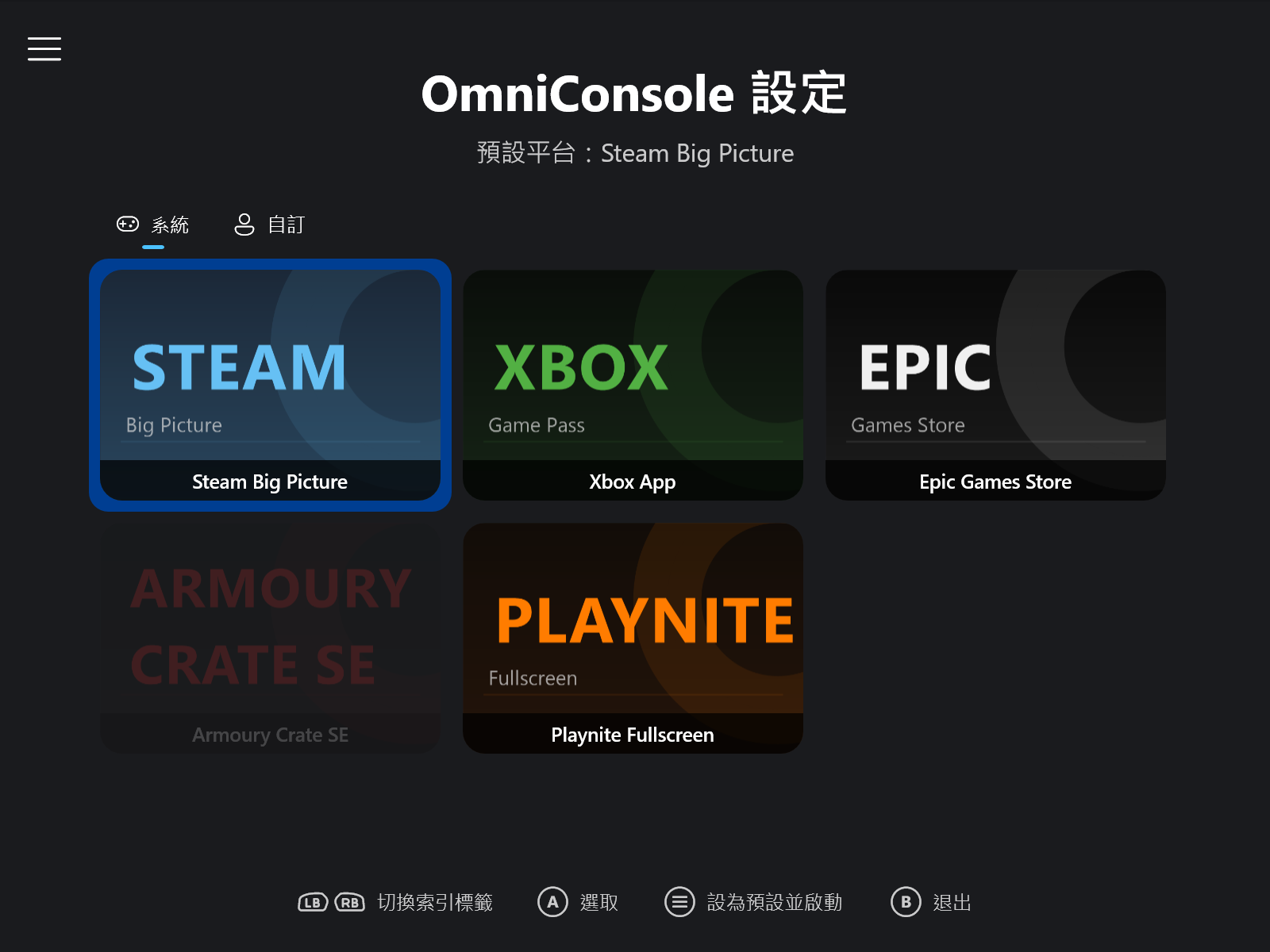 | 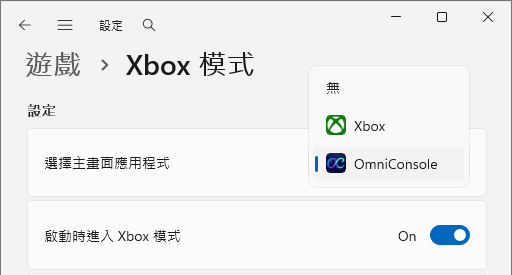 |
| OmniConsole 設定 | 設定 → 遊戲 → 全螢幕體驗 |
📢 An Important Update is Available!
You are viewing an older release. For the latest features, bug fixes, and the best user experience, please download the most current version from the link below.
📢 溫馨提示:有更新的版本可供下載!
您正在查看的是一個舊版本。為了獲得最新的功能、錯誤修正與最佳體驗,請透過以下連結下載最新版本。
➡️ Download the Latest Version Here / 點此下載最新版本 ⬅️
简体中文: 这是一个旧版本,请点击上方链接下载最新版本。
日本語: これは古いバージョンです。上のリンクから最新バージョンをダウンロードしてください。
한국어: 이 버전은 이전 릴리스입니다. 위 링크를 통해 최신 버전을 다운로드하십시오.
❤️ 支持這個專案 (Support This Project)
如果您覺得這個工具對您有幫助,您的支持會是我持續維護與開發更多開源專案的莫大動力!
If you find this tool helpful, your support would be a great motivation for me to continue maintaining and developing more open-source projects!
English
💡 Important Findings & Usage Tips
- Unlock the "Full" Handheld Experience:
- Microsoft's native implementation on Dev Build 26220.7271 is currently a "Limited" PC version. It lacks the "Enter on startup" option and performance optimizations (users must manually enter via Task View).
- This tool enables the "Full" Handheld version (identical to the ROG Xbox Ally series) across all supported builds (24H2, 25H2, 25H2 RP, 25H2 Dev). This unlocks the critical "Enter full screen experience on startup" option, which provides true system performance optimization and frees up more memory.
- Solving Startup Issues:
- For users on older builds (24H2, 25H2, 25H2 RP) who experience boot failures (booting to desktop instead of FSE due to losing the startup race condition), the recommended fix is to upgrade to Dev Build 26220.7271.
- By combining the new OS build with this tool's Native Mode (which requires no screen dimension overrides), you can achieve a 100% reliable boot into the FSE Shell.
- Upgrade Workflow:
- Recommended: Upgrade Windows to 26220.7271 first, then upgrade this tool. It will automatically apply the Native configuration.
- If you upgrade Windows after upgrading the tool: Simply open the tool and click "Enable" again to migrate to the Native configuration.
- Gamepad Keyboard:
- It is highly recommended to check "Start gamepad keyboard on logon". This ensures you can use your controller to type in text fields, such as the Xbox App search bar.
v0.0.18: Refactored Keyboard Detection and Enhanced Driver Management Logic
This update introduces architectural improvements to the gamepad keyboard handling, transitioning to IFrameworkInputPane for reliable detection. It also reinforces the "Driver Mode" against OEM resets and refines the uninstallation process.
✨ What's New in This Release
- Refactored Gamepad Keyboard Detection:
- Replaced the legacy window polling mechanism with
IFrameworkInputPane. - Optimized the active polling of visibility state, allowing the keyboard to initialize and auto-hide more efficiently.
- Removed the dependency on
dwmapi.dll.
- Replaced the legacy window polling mechanism with
- Driver Mode Persistence Fix:
- "Driver Mode" (
PhysPanelDrv) now also creates the helper task (XFSET-SetPanelDimensionsin registry-only mode). - This ensures the critical
DeviceFormregistry key is forcibly reapplied on every boot, preventing resets by OEM drivers (e.g., on Surface devices).
- "Driver Mode" (
- Improved Installation & Uninstallation Logic:
- The uninstaller now detects existing log files and prompts the user to delete them.
- The driver installation logic (during enablement) now checks for existing certificates to prevent redundancy, while the uninstaller ensures the
PhysPanelDrvcertificate is correctly removed.
- UI Refinements:
- Adjusted the font size of quick access buttons to improve visual density and ensure text fits comfortably.
🛠️ Installation Instructions
Choose between two installer types.
Setup-0.0.18-Full.msi(Recommended):- Includes everything you need. No prerequisites required.
Setup-0.0.18-Lite.msi:- A smaller download, but requires the .NET 8 Desktop Runtime (x64) to be installed first.
For all users: Download the installer of your choice and run it. It will handle both new installations and upgrades automatically.
中文 (繁體)
💡 重要發現與使用技巧
- 解鎖「完整」掌機體驗:
- 目前微軟在 Dev Build 26220.7271 推送的原生功能屬於 「PC 受限版 (Limited)」。它不包含開機自動啟動選項,也沒有效能最佳化 (僅能透過 工作檢視 (Task View) 手動進入)。
- 本工具能強制開啟「完整」掌機版 FSE (同 ROG Xbox Ally 系列功能)。無論您是在 24H2、25H2、25H2 RP 或 25H2 Dev 版本,都能獲得關鍵的 「啟動時進入全螢幕體驗」 選項,這能啟用真正的系統效能最佳化並騰出更多記憶體。
- 解決開機啟動失敗:
- 對於在舊版本 (24H2、25H2、25H2 RP) 上遇到開機直接進入桌面 (未能贏得競態條件) 的使用者,最佳解決方案是 升級至 Dev Build 26220.7271。
- 搭配本工具的 原生模式 (Native Mode) (無需螢幕尺寸覆寫),即可 100% 順利進入 FSE Shell。
- 升級流程建議:
- 推薦: 先升級 Windows 至 26220.7271,再更新本工具,即可自動套用原生設定。
- 若您先安裝工具才升級系統: 請在升級後開啟工具,再次點選 「啟用 (Enable)」 按鈕以完成設定遷移。
- 遊戲控制器鍵盤:
- 強烈建議勾選 「在登入時啟動遊戲控制器鍵盤」。這樣您才能使用手把在 Xbox App 的搜尋列中輸入文字。
v0.0.18:重構鍵盤偵測與驅動管理邏輯增強
本次更新改進了遊戲控制器鍵盤的處理架構,採用 IFrameworkInputPane 以實現更可靠的偵測。同時,針對「驅動程式模式 (Driver Mode)」進行了強化,以防止 OEM 設定重置,並改進了移除流程。
✨ 本次更新亮點
- 重構遊戲控制器鍵盤偵測:
- 捨棄了舊式的視窗輪詢機制,改用
IFrameworkInputPaneCOM 介面。 - 最佳化了對鍵盤可見狀態的主動偵測,讓鍵盤的初始化與自動隱藏更有效率。
- 移除了對
dwmapi.dll的依賴。
- 捨棄了舊式的視窗輪詢機制,改用
- 驅動模式持久化修復:
- 「驅動程式模式」 (
PhysPanelDrv) 現在也會建立輔助工作排程 (XFSET-SetPanelDimensions,僅限登錄檔模式)。 - 這確保了關鍵的
DeviceForm登錄檔鍵值會在每次開機時被強制重新套用,防止 OEM 驅動程式 (如 Surface 裝置) 將其重置。**: - 解除安裝程式現在會偵測殘留的日誌檔,並詢問是否將其刪除。
- 驅動程式安裝邏輯 (啟用時) 現在會檢查憑證是否已存在以避免重複;解除安裝程式則會正確移除
PhysPanelDrv的系統憑證。
- 「驅動程式模式」 (
- 介面最佳化:
- 調整了快速存取按鈕的字體大小,最佳化視覺密度並確保文字完整顯示。
🛠️ 安裝說明
可選擇以下兩種安裝程式。
Setup-0.0.18-Full.msi(推薦):- 已包含所有必要元件,無需安裝任何前置需求。
Setup-0.0.18-Lite.msi:- 檔案較小,但需要先安裝 .NET 8 桌面執行階段 (x64)。
所有使用者:請直接下載偏好的安裝程式並執行即可。它會自動處理全新安裝與版本升級。
中文 (简体)
💡 重要发现与使用技巧
- 解锁“完整”掌机体验:
- 目前微软在 Dev Build 26220.7271 推送的原生功能属于 “PC 受限版 (Limited)”。它不包含开机自动启动选项,也没有性能优化 (仅能通过 任务视图 (Task View) 手动进入)。
- 本工具能强制开启“完整”掌机版 FSE (同 ROG Xbox Ally 系列功能)。无论您是在 24H2、25H2、25H2 RP 或 25H2 Dev 版本,都能获得关键的 “启动时进入全屏体验” 选项,这能启用真正的系统性能优化并腾出更多内存。
- 解决开机启动失败:
- 对于在旧版本 (24H2、25H2、25H2 RP) 上遇到开机直接进入桌面 (未能赢得竞态条件) 的用户,最佳解决方案是 升级至 Dev Build 26220.7271。
- 搭配本工具的 原生模式 (Native Mode) (无需屏幕尺寸覆写),即可 100% 顺利进入 FSE Shell。
- 升级流程建议:
- 推荐: 先升级 Windows 至 26220.7271,再更新本工具,即可自动应用原生设置。
- 若您先安装工具才升级系统: 请在升级后打开工具,再次点击 “启用 (Enable)” 按钮以完成配置迁移。
- 游戏控制器键盘:
- 强烈建议勾选 “在登录时启动游戏控制器键盘”。这样您才能使用手柄在 Xbox App 的搜索栏中输入文字。
v0.0.18:重构键盘检测与驱动管理逻辑增强
本次更新改进了游戏控制器键盘的处理架构,采用 IFrameworkInputPane 以实现更可靠的检测。同时,针对“驱动程序模式 (Driver Mode)”进行了强化,以防止 OEM 设置重置,并改进了卸载流程。
✨ 本次更新亮点
- 重构游戏控制器键盘检测:
- 舍弃了旧式的窗口轮询机制,改用
IFrameworkInputPaneCOM 接口。 - 优化了对键盘可见状态的主动检测,让键盘的初始化与自动隐藏更效率。
- 移除了对
dwmapi.dll的依赖。
- 舍弃了旧式的窗口轮询机制,改用
- 驱动模式持久化修复:
- “驱动程序模式” (
PhysPanelDrv) 现在也会创建辅助任务计划 (XFSET-SetPanelDimensions,仅限注册表模式)。 - 这确保了关键的
DeviceForm注册表键值会在每次开机时被强制重新应用,防止 OEM 驱动程序 (如 Surface 设备) 将其重置。
- “驱动程序模式” (
- 改进安装与卸载流程:
- 卸载程序现在会检测残留的日志文件,并询问是否将其删除。
- 驱动程序安装逻辑 (启用时) 现在会检查证书是否已存在以避免重复;卸载程序则会正确移除
PhysPanelDrv的系统证书。
- 界面优化:
- 调整了快速访问按钮的字体大小,优化视觉密度并确保文本完整显示。
🛠️ 安装说明
可选择以下两种安装程序。
Setup-0.0.18-Full.msi(推荐):- 已包含所有必要组件,无需安装任何前置需求。
Setup-0.0.18-Lite.msi:- 文件较小,但需要先安装 .NET 8 桌面运行环境 (x64)。
所有用户:请直接下载偏好的安装程序并运行即可。它会自动处理全新安装与版本升级。
Full Changelog: v0.0.17...v0.0.18