
v1.8.0.0: OmniCharm Widget & Gamepad Mouse Mode Force On
✨ New Features
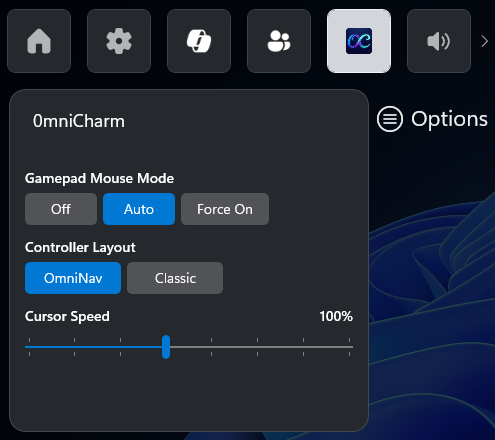
- OmniCharm — Game Bar Widget: A new Game Bar widget lets you toggle Gamepad Mouse Mode, switch between OmniNav and Classic layouts, and adjust cursor speed on the fly during gameplay. Open Game Bar (Xbox button), find OmniCharm in the widget menu, and pin it for one-press access.
- Gamepad Mouse Mode: Gamepad Mouse Mode is now a three-way setting.
- Off — disabled.
- Auto — active in browsers, File Explorer, desktop Steam, and Epic Games Store.
- Force On — active in all apps, except Xbox App, Armoury Crate SE, Playnite Fullscreen, Steam Big Picture, and FSE Task View.
- In-app OmniCharm install: OmniConsole will detect the missing widget and offer a one-tap install from the settings page.
🔧 Improvements
-
Auto mode now also covers File Explorer and desktop Steam in addition to browsers and Epic Games Store.
Button OmniNav Classic Left Stick Cursor Scroll Right Stick Scroll Cursor A Left Click Enter B Right Click Esc X Page Down Page Down Y Page Up Page Up LB Ctrl+Shift+Tab Tab RB Ctrl+Tab Left Click LT Esc Shift+Tab RT Enter Right Click LS Shift+Tab — RS Tab — D-pad Arrow Keys (hold to repeat) Arrow Keys (hold to repeat)
🛠️ Installation Instructions
Download OmniConsole_1.8.0.0_x64.zip from the Assets below and extract it.
Option A: Install.bat (Recommended)
- Run
Install.bat. It will enable Developer Mode, install the certificate, and install both MSIX packages automatically.
Option B: Manual Install
- [Critical] Go to Windows Settings → System → Advanced and enable Developer Mode.
- [Critical] Double-click the
.cerfile → click Install Certificate → Store Location: Local Machine → Place all certificates in the following store → Browse → select Trusted People → Finish. (Skip this step if you already have the certificate installed) - Double-click
OmniConsole_1.8.0.0_x64.msixto install the main app. - Double-click
OmniConsole.PhantomLink_1.8.0.0_x64-widget.msixto install the OmniCharm widget.
⚙️ Prerequisites
- Windows 11 24H2 (Build 26100.7019)+ with Full Screen Experience (FSE) enabled.
- Desktops, Laptops, Tablets & Handhelds without Native FSE: Use Xbox Full Screen Experience Tool to enable FSE first.
- Native FSE Handheld Devices (e.g., ROG Xbox Ally series): FSE is natively supported. Install OmniConsole directly.
- Xbox Controller Required: Game Bar, FSE, and all gamepad features require an Xbox-compatible (XInput) controller with an Xbox button.
v1.8.0.0: OmniCharm 小工具與手把滑鼠模式強制開啟
✨ 新功能
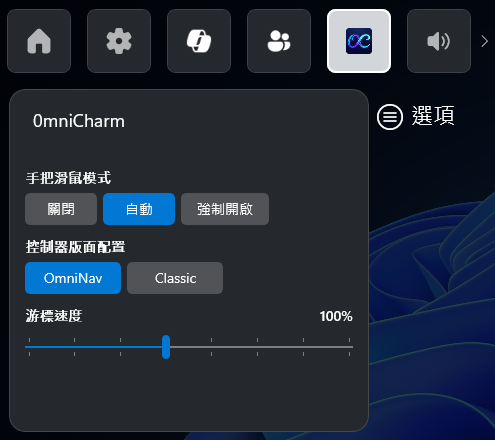
- OmniCharm — Game Bar 小工具:全新 Game Bar 小工具,讓您在遊戲中隨時切換手把滑鼠模式、在 OmniNav 與 Classic 版面配置間切換、調整游標速度。開啟 Game Bar(Xbox 按鈕)後,在小工具選單中找到 OmniCharm,釘選即可一按存取。
- 手把滑鼠模式:手把滑鼠模式現在是三態設定。
- 關閉 — 停用。
- 自動 — 在瀏覽器、檔案總管、桌面版 Steam 與 Epic Games Store 中啟用。
- 強制開啟 — 在所有應用程式中啟用,除了 Xbox App、Armoury Crate SE、Playnite Fullscreen、Steam Big Picture 與 FSE Task View。
- 應用程式內安裝 OmniCharm:OmniConsole 會自動偵測缺少的小工具,並在設定頁提供一鍵安裝。
🔧 改進
-
自動模式除了瀏覽器與 Epic Games Store,新增涵蓋檔案總管與桌面版 Steam。
按鍵 OmniNav Classic 左搖桿 游標 滾輪 右搖桿 滾輪 游標 A 滑鼠左鍵 Enter B 滑鼠右鍵 Esc X Page Down Page Down Y Page Up Page Up LB Ctrl+Shift+Tab Tab RB Ctrl+Tab 滑鼠左鍵 LT Esc Shift+Tab RT Enter 滑鼠右鍵 LS Shift+Tab — RS Tab — 方向鍵 方向鍵(長按連發) 方向鍵(長按連發)
🛠️ 安裝說明
從下方 Assets 下載 OmniConsole_1.8.0.0_x64.zip 並解壓縮。
方式 A:Install.bat(建議)
- 執行
Install.bat,將自動開啟開發人員模式、安裝憑證與兩個 MSIX 套件。
方式 B:手動安裝
- [重要] 前往設定 → 系統 → 進階,啟用開發人員模式。
- [重要] 點兩下
.cer檔案 → 點選安裝憑證 → 存放區位置選擇本機電腦 → 將所有憑證放入以下的存放區 → 瀏覽 → 選擇受信任的人 → 完成。(若您之前已安裝過,則無需重複此步驟。) - 點兩下
OmniConsole_1.8.0.0_x64.msix安裝主程式。 - 點兩下
OmniConsole.PhantomLink_1.8.0.0_x64-widget.msix安裝 OmniCharm 小工具。
⚙️ 前置條件
- Windows 11 24H2 (Build 26100.7019)+,且已啟用全螢幕體驗 (FSE) 功能。
- 桌機、筆電、平板及未內建 FSE 的掌機:請先使用 Xbox Full Screen Experience Tool 啟用 FSE 功能。
- 原生 FSE 掌機裝置(例如 ROG Xbox Ally 系列):已原生支援 FSE,可直接安裝 OmniConsole。
- 需要 Xbox 手把:Game Bar、FSE 以及所有手把功能皆需使用具備 Xbox 按鈕的 XInput 相容控制器。
Full Changelog: v1.7.1.0...v1.8.0.0